 HyperBabel
API Reference
Complete reference documentation for the HyperBabel API Platform.
Authentication
Server-to-server requests must include your API key in the Authorization header. Generate your API key from Console → API Keys. Never ship the API key inside a mobile or web app — client apps send a customer JWT in the same header instead (see Customer Auth).
Authorization: Bearer hb_live_xxxxxxxxxxxxxxxxxxxxxxxxxxxxxxxxAPI Key Types
hb_live_...— Live key
Routes that take a different credential
POST /customer/auth/firebase-exchange— your user's Firebase ID token as the Bearer token.POST /customer/refresh— the refresh token in the JSON body; no Authorization header./auth/webhooks/*— a Console sign-in session only; API keys are rejected with 401.
Authentication errors
The codes below come from routes that take only an API key (Video, Live Stream, Translation, /customer/issue-token, /customer/revoke). Routes that also accept a customer JWT (United Chat, Presence, Push, User Blocks, Storage, Speech Translation) and the Usage API answer a missing or unreadable bearer with 401 and a plain-string body — { "error": "Unauthorized: No token provided" } or { "error": "Unauthorized: Invalid token" } — and an expired or revoked customer JWT is answered the same way. Branch on the HTTP status first; read error.code only when error is an object.
| Status | error.code | Meaning |
|---|---|---|
| 401 | missing_api_key | No Authorization: Bearer … header. |
| 401 | invalid_api_key_format | The bearer value is not an hb_… key. |
| 401 | invalid_api_key | Unknown key. |
| 401 | api_key_revoked · api_key_expired | The key was revoked or has expired — create a new one in the Console. |
| 403 | origin_not_allowed | The key has an Allowed Origins list and the request's Origin is not on it (keys with an empty list are not origin-restricted). |
| 403 | account_suspended | The organization account is not active. |
| 403 | subscription_inactive | No active subscription (paused or expired). |
| 403 | insufficient_scope | The key does not have the scope this route needs (for example chat or video_call). |
| 403 | quota_exceeded | Free plan only — the monthly allocation for this service is used up. |
Rate limits
Requests are limited per minute — per API key, or per end user for customer-JWT calls. The limit depends on your plan (60 requests per minute on the Free plan). Responses carry X-RateLimit-Limit, X-RateLimit-Remaining and X-RateLimit-Reset (Unix seconds). Going over returns 429 { error: { code: 'rate_limit_exceeded', message, retry_after } } with a Retry-After header — wait that many seconds before retrying. The token routes that run before a user is known (POST /customer/auth/firebase-exchange and POST /customer/refresh) are limited per IP address instead — 300 requests per minute — and answer the same 429 body with Retry-After: 60 but without the X-RateLimit-* headers.
Base URL
https://api.hyperbabel.com/api/v1Usage API
Monitor your API usage programmatically. Use this for billing alert automation or to build internal cost dashboards. Account management (register, login, API key creation) is done through the HyperBabel Console, not via API.
Get Usage Summary
/api/v1/auth/usageServer-to-server only: authenticate with your organization API key. End-user (customer) JWTs are rejected with 403 forbidden — this is your organization's plan and billing data, not something an app user should read. Return the current month's usage counters together with your plan's monthly limits as one flat object. Use for programmatic monitoring or billing alert automation. Compare each counter against its matching monthly_* limit (-1 means unlimited). Note: large counters are returned as JSON strings (BIGINT-backed) — parse with Number() before comparing.
// GET — no body
// Headers
Authorization: Bearer hb_live_xxx
// 200 — flat object: current-month counters + plan limits
// BIGINT-backed counters serialize as strings — parse with Number().
{
  "messages_sent": "12400",
  "connection_mins": "5320",
  "translate_chars": "89000",
  "hd_video_mins": 320,
  "fhd_video_mins": 40,
  "hd_stream_mins": 60,
  "fhd_stream_mins": 0,
  "storage_used_mb": "1240",
  "stt_mins": "12",
  "api_calls": "48210",

  "monthly_messages": "100000",
  "monthly_connection_mins": "60000",
  "monthly_peak_connections": 500,
  "monthly_translate_chars": "1000000",
  "monthly_storage_mb": 10240,
  "monthly_hd_video_mins": 3000,
  "monthly_fhd_video_mins": 500,
  "monthly_hd_stream_mins": 1000,
  "monthly_fhd_stream_mins": 200,
  "monthly_stt_mins": "300",
  "max_channels": 500,
  "max_api_keys": 10,
  "max_group_members": 100,
  "max_open_members": 500,

  "plan_name": "Basic",               // plan display name (Free · Basic · Scale)
  "current_period_end": "2026-04-01T00:00:00.000Z",
  "active_key_count": "2"
}

// 404 — org has no active subscription
{ "error": "No active subscription found" }
Customer Auth
Mint short-lived JWTs scoped to one of your end-users so your mobile and web apps never need to embed a HyperBabel API key. Your backend stays the only place that holds hb_live_…; client apps carry only per-user tokens.
[ Client App ] ──Sign in with Firebase──→ Firebase ID token
     │
     │ POST /customer/auth/firebase-exchange   (Firebase users — direct, no backend hop)
     │ Authorization: Bearer <firebase-id-token>
     ▼
[ HyperBabel API ] ── verify token → mint customer JWT
     │
     │ { access_token, refresh_token, ... }
     ▼
[ Client App ] ──Bearer <customer access token>──→ /unitedchat, /presence, /storage, ...

Other auth providers (Auth0 / Cognito / your own): your backend calls
/customer/issue-token with the org API key and forwards the JWT to the client.
⚠️ Why this exists
Embedding hb_live_… in a mobile app means anyone who decompiles the APK / IPA gets full access to your org. Web apps face the same risk through the network tab. This Customer Auth pattern is the recommended approach for API key security in client apps — short-lived per-user tokens keep your org credential on your backend where it belongs.
When to use which credential
hb_live_…
Org API key
Server-to-server only — your backend, Cloud Function, Lambda. Never ship in a mobile or browser binary.
eyJ… (customer JWT)
Per-end-user, 1h access
Every SDK-facing call from a client app — United Chat (incl. room-scoped video calls), RTM, presence, push, user blocks, storage uploads, and speech translation. Mint via /customer/auth/firebase-exchange (Firebase users, client-direct) or /customer/issue-token (other auth providers, server-to-server).
Exchange Firebase ID Token (client-direct, no backend hop)
/api/v1/customer/auth/firebase-exchangeFor apps already using Firebase Auth. The client sends its short-lived Firebase ID token in the Authorization header — HyperBabel verifies it against Google's JWKS and mints a customer JWT for the same end-user. Register your Firebase project ID in Console → Customer Auth → Firebase Projects before calling. external_user_id, display_name, and email are auto-extracted from the verified token. Always send a JSON body — at least {}; an empty body is rejected with 400.
POST /api/v1/customer/auth/firebase-exchange Authorization: BearerContent-Type: application/json { "preferred_lang_cd": "ko-KR" // optional: send the device locale; the // server normalizes against the supported // translation languages and falls back to 'en' }
// Same shape as /customer/issue-token
{
  "access_token":       "eyJhbGc…",
  "refresh_token":      "eyJhbGc…",
  "expires_at":          1762450000,
  "refresh_expires_at":  1764991600,
  "user_id":             "079632a3-…",
  "external_user_id":    "firebase-uid",   // Firebase UID
  "org_id":              "11b20b79-…",
  "session_id":          "02ddc384-…",
  "preferred_lang_cd":   "ko",             // canonical code actually stored
  "token_type":          "Bearer"
}
Issue Customer Token (server-to-server)
/api/v1/customer/issue-tokenMint a (access_token, refresh_token) pair scoped to one of your end-users. Server-to-server only — never call from a mobile or browser app. external_user_id is your stable opaque identifier (UUID recommended).
preferred_lang_cd is used to seed the user's preferred language on their first token issuance only. On subsequent calls for an existing user, the value stored in HyperBabel is preserved — sending a different code does not overwrite the user's chosen language. To update it explicitly, call PATCH /api/v1/customer/users/me from the client app with the user's customer JWT and the body { "preferred_lang_cd": "ko" }.
POST /api/v1/customer/issue-token
Authorization: Bearer hb_live_xxx
Content-Type: application/json

{
  "external_user_id": "alice-uuid",
  "display_name": "Alice Chen",
  "preferred_lang_cd": "en"
}{
"access_token": "eyJhbGc…",
"refresh_token": "eyJhbGc…",
"expires_at": 1762450000,
"refresh_expires_at": 1764991600,
"user_id": "079632a3-…",
"external_user_id": "alice-uuid",
"org_id": "11b20b79-…",
"session_id": "02ddc384-…",
"preferred_lang_cd": "en", // canonical code actually stored
"token_type": "Bearer"
}Refresh Customer Token (client-direct)
/api/v1/customer/refreshRotate a JWT pair using its refresh token. Safe to call directly from the client app — the refresh token in the body authenticates the request, no Authorization header needed. Old refresh token is revoked atomically; new pair has a fresh session_id. Errors: 400 for an empty body or a missing / malformed refresh_token (invalid_request), 401 when the refresh token is expired, revoked or not genuine, 429 when the per-IP limit is hit.
POST /api/v1/customer/refresh
Content-Type: application/json

{
  "refresh_token": "eyJhbGc…"
}// Same shape as /customer/issue-token { "access_token": "eyJhbGc…", // new "refresh_token": "eyJhbGc…", // rotated "session_id": "1b124c26-…", // new sid ... }
Revoke Customer Sessions (server-to-server)
/api/v1/customer/revokeInvalidate every active session for one external_user_id. Takes effect everywhere within about a minute (up to ~75 seconds). Use on log-out-everywhere, password-changed, or abuse signals.
POST /api/v1/customer/revoke
Authorization: Bearer hb_live_xxx
Content-Type: application/json

{
  "external_user_id": "alice-uuid"
}{
"revoked": 3
}Get Current Customer Identity
/api/v1/customer/meVerifies the customer JWT and returns the identity it represents, plus the user's directory profile fields. Useful for client-side debugging and 'who am I' UX.
GET /api/v1/customer/me
Authorization: Bearer
{
  "org_id":            "11b20b79-…",
  "user_id":           "079632a3-…",
  "external_user_id":  "alice-uuid",
  "display_name":      "Alice Chen",
  "preferred_lang_cd": "en",
  "photo_url":         "https://cdn.hyperbabel.com/…",   // null until set
  "photo_variants":    { "sm": "…", "md": "…", "lg": "…" },  // null until set
  "bio":               "Coffee & code",                   // null until set
  "country_cd":        "KR",                              // null until set
  "interests":         ["music", "travel"],               // [] until set
  "timezone":          "Asia/Seoul",                      // null until set
  "discoverable":      true,
  "status":            "active",
  "session_id":        "02ddc384-…"
}
Token lifetimes & safety boundary
- Access token: 1 hour by default. Override per org from Console → Customer Auth (5 min – 24 h).
- Refresh token: 30 days, fixed. Rotated on every
/refresh. - Scope: Customer JWTs reach
/unitedchat(including room-scoped video calls),/rtm,/presence,/push,/users(block),/storage(presign, confirm, url), and the Speech Translation API (/stt/languages,/stt-relay)./chatis server-to-server only — a customer JWT gets403 forbiddenthere./video,/streamand/translateare org-API-key-only — a customer JWT gets401there (start calls via the United Chat room-scoped flow instead; chat translation is built in). They also cannot reach console or administration endpoints, or/auth/api-keys. - Identity scoping: a customer JWT may only act as its own end-user. Every body or query field that names the acting user is checked —
sender_idon send message;user_idon room list / room detail, leave, join, join-by-code, mark-read, rename, description, edit / delete message, reactions, pin, typing, typing-prefs, mute and freeze;creator_idon room create;banned_by/unbanned_by;owner_idon sub-admin changes;actor_idon add-members;user_idon presence and push;blocker_idon block / unblock / block-list; anduser_idon video-call accept / joined-rtc / reject / end / leave / renew-token. An id that doesn't match the token'sexternal_user_idreturns403 forbidden. Get messages additionally requires room membership.caller_idon call start is not rejected — the server replaces it with the token owner's id. Org API keys and org JWTs are backend credentials and can act on behalf of any of the org's users. - Revocation latency:
/revoketakes effect everywhere within about a minute (up to ~75 seconds) — tokens already in flight keep working until then. - Refresh audit trail: every
/refreshrotates the pair atomically (the previous refresh token is revoked) and records the current device's user-agent and IP on the new session (kept server-side for audit). Console → Customer Auth → End Users shows each user's last activity and active-session count. - Defensive client guard: add a one-line check in your HTTP client that throws if any header value starts with
hb_live_orhb_test_— catches accidental regressions where a future commit reintroduces the org key. - Quota impact: all API traffic authenticated with a customer JWT counts against your org's monthly plan quotas — chat messages, video / live-stream minutes, translation chars, storage MB, presence (connection) minutes — same as direct API-key calls. Customer JWTs only change scope (no console, administration or API-key endpoints), not billing. Use the Console → Subscription dashboard to see the rolled-up totals.
Working examples
All six open-source sample demos wire the full Firebase ID token exchange flow end-to-end — sign-in, customer JWT issuance, silent refresh, and the hb_live_/hb_test_ guard described above. Pick the platform you ship on.
Which Chat API should I use?
HyperBabel provides two complementary chat APIs. Both share the same underlying infrastructure — choose based on how much you want HyperBabel to manage for you.
/api/v1/chat/🔒 Server-to-server only. Call it from your backend with your organization API key. End-user (customer) JWTs are rejected with 403 on reads as well as writes — for an app your users sign in to, use United Chat.
Pure messaging layer. You manage rooms & members. Best for embedding messaging into an app that already has its own user/room management.
Includes
/api/v1/unitedchat/👤 Your users can call this directly. Works with an organization API key or an end-user (customer) JWT from Customer Auth, so the app talks to HyperBabel without routing every message through your backend.
Complete chat solution. HyperBabel manages rooms, roles & video. Best for building a full-featured chat app quickly.
Most of the Chat API, plus
🔍 Pick by scenario
Build a KakaoTalk / LINE-style chat app
🚀United Chat APIAdd 1:1 live support or a customer-service chatbot to my existing app
💬Chat APICommunity / fan club with open rooms and moderators
🚀United Chat APIIoT device log stream or server-to-server messaging
💬Chat APIGroup video call + chat room integration
🚀United Chat APII already manage my own rooms/users — just need messaging
💬Chat APIUnited Chat API
Unified room-based chat with built-in 1:1, Group, and Open chat support — including real-time messaging, role management, and integrated video calls. Every endpoint accepts your org API key from your server (Authorization: Bearer hb_live_xxx, with the chat scope) or an end-user customer JWT from your app (see Customer Auth) — a customer JWT may only act as its own user id. With a customer JWT, room-scoped reads (room details, members, bans, messages, search, typing, typing prefs, batch translate) require room membership; in open rooms, non-members may also read the room details, members and search. A non-member gets 403 forbidden (batch translate instead returns empty translations).
Create Room
/api/v1/unitedchat/roomsCreate a chat room. room_type: '1to1' | 'group' | 'open'. For 1:1, pass members with 1 user_id. For group, pass members array. New rooms return 201 with the full room. If the 1:1 pair (or a group with exactly the same member set) already exists, the response is HTTP 200 with only { room: { id, already_exists: true } } — no realtime_channel; call GET /rooms/:roomId to get it. A description is stored for open rooms only. Errors: 403 blocked_by_recipient when one user of a 1:1 pair has blocked the other, 403 quota_exceeded when the Free plan's channel limit is reached.
// 1:1 room
{
  "room_type": "1to1",
  "creator_id": "user_A",
  "members": ["user_B"]
}

// Group room
{
  "room_type": "group",
  "room_name": "Project Alpha",
  "creator_id": "user_A",
  "members": ["user_B", "user_C"]
}

// Open room (public; member cap = your plan's open-room limit, e.g. 100 on Free)
{
  "room_type": "open",
  "room_name": "Community Hub",
  "creator_id": "user_A"
}
{
  "room": {
    "id": "uuid-xxxx",
    "channel_type": "group",
    "channel_name": "uc-m8z3k1",
    "room_type": "group",
    "realtime_channel": "hb:org_uuid:uc-m8z3k1",
    "created_at": "2026-03-11T10:00:00Z"
  }
}List Rooms
/api/v1/unitedchat/roomsGet all rooms the user is a member of, plus joinable open rooms. Pass user_id as a query param. Pass lang (e.g. 'ko', 'ja') to get open-room descriptions translated. Translations come from a server-side cache: the first call for a room and language has no description_translated (the server fills the cache in the background, a few rooms per request), and later calls include it. lang=en is never translated. Render description_translated || description. Each entry in rooms also embeds last_message — the most recent message in that channel (or null if empty) — so a chat-list UI can render previews without a follow-up call per room. Deleted messages are returned with deleted_at set so the client can render a 'Message deleted' placeholder. On 1:1 rooms, peer_user_id is the other member's user id — it is null for group and open rooms, once the peer has left the room, or while the peer has no end-user record yet (one is created when your server issues that user a realtime token or a customer JWT).
// GET — no body
// Query: ?user_id=user_A&lang=ko
{
  "rooms": [
    {
      "id": "uuid-xxxx",
      "channel_type": "group",
      "room_name": "Project Alpha",
      "realtime_channel": "hb:org_uuid:uc-m8z3k1",
      "member_count": "3",
      "unread_count": 5,                                 // number (member_count stays a string)
      "peer_user_id": null,                              // 1:1 rooms: the other member's user id (null here — group room)
      "last_message": {                                  // null when the room has no messages yet
        "id": "msg-uuid-zzzz",
        "channel_id": "uuid-xxxx",
        "sender_id": "user_B",
        "content": "안녕하세요",
        "message_type": "text",                          // text | image | video | audio | file | location | contact | video_call | system
        "sender_lang_cd": "ko",                          // ISO-639-1 the sender wrote in
        "translated_content": { "en": "Hello" },         // server-side cache; populated lazily as users request translations
        "metadata": null,
        "deleted_at": null,                              // ISO timestamp when the sender removed the message
        "created_at": "2026-05-20T12:34:56Z",
        "updated_at": null
      }
    }
  ],
  "open_rooms": [
    {
      "id": "uuid-yyyy",
      "display_name": "Community Hub",
      "description": "A space for HyperBabel developers 🚀",
      "description_translated": "HyperBabel 개발자를 위한 공간 🚀",  // absent until a cached translation exists for lang
      "invite_code": "a1b2c3d4",
      "member_count": "42",
      "is_joinable": true                                // always true — room capacity is checked by the join call (403 room_full)
    }
  ]
}Get Room
/api/v1/unitedchat/rooms/:roomIdGet room details including full member list with roles. Optional ?user_id= personalizes display_name, custom_name and has_incoming_message for that user.
// GET — no body
// Path: :roomId = room UUID
{
  "room": {
    "id": "uuid-xxxx",
    "channel_type": "group",
    "display_name": "Project Alpha",
    "realtime_channel": "hb:org_uuid:uc-m8z3k1",
    "members": [
      { "user_id": "user_A", "role": "owner", "joined_at": "2026-03-11T10:00:00Z" },
      { "user_id": "user_B", "role": "member", "joined_at": "2026-03-11T10:01:00Z" }
    ]
  }
}Update Room Name
/api/v1/unitedchat/rooms/:roomId/nameSet a custom display name for the room (per-user). Each member can have their own name for the room. Open rooms return 403 forbidden — an open room's name cannot be changed after creation.
{
  "user_id": "user_A",
  "custom_name": "My Alpha Team"
}{ "success": true }Update Open Room Description
/api/v1/unitedchat/rooms/:roomId/descriptionSet or update the description for an open room (owner only). The description is visible in the open room list, helping users understand the room's purpose before joining. Pass null to clear.
{
  "user_id": "owner_user",
  "description": "A public room for discussing HyperBabel integrations 🚀"
}{ "success": true, "description": "A public room for discussing HyperBabel integrations 🚀" }Join Open Room by Invite Code
/api/v1/unitedchat/rooms/join-by-codeJoin an open room using its 8-character invite code — no room ID required. How to get the code: open the chat room → click 🛡️ Members in the header → copy the Invite Code, or click 📋 Copy Link which generates a shareable URL like /join?code=a1b2c3d4 — extract the code param. ⚠️ user_id does NOT need to be pre-registered in HyperBabel — pass your own app's user identifier directly. Idempotent (safe to call multiple times). Banned users get 403. Full rooms get 403 room_full. On first join, broadcasts 'Yujin joined the room' system message to all members in real time.
// ── How to get the invite_code (programmatic)
// Option A — List all open rooms the user hasn't joined yet:
//   GET /api/v1/unitedchat/rooms?user_id=X
//   → response.open_rooms[N].invite_code
//
// Option B — Get a specific room's details (member or owner):
//   GET /api/v1/unitedchat/rooms/:roomId
//   → response.room.invite_code
//
// Option C — UI (Console or your app):
//   Chat header → 🛡️ Members → Invite Code box → 📋 Copy Link
//   Shareable URL format: https://yourconsole.com/join?code=XXXXXXXX

// ── Step 1: Authorization header
// Your org API key from your server, or the user's customer JWT from your app
Authorization: Bearer hb_live_xxxxxxxxxxxxxxxxxxxx

// ── Step 2: Request body
{
  // 8-char invite code obtained via API or Copy Link above
  "invite_code": "a1b2c3d4",

  // Your own app's user ID — no pre-registration in HyperBabel needed
  // Pass any string that uniquely identifies the user in your system
  "user_id": "user_C",

  // Optional: shown in the system message broadcast to the room
  // e.g. "Yujin joined the room"
  // API key: falls back to the user's registered name, then user_id
  // Customer JWT: ignored — the token's user name is used
  "display_name": "Yujin"
}

// ── Error cases
// 400  — invite_code or user_id missing
// 403  — user is banned from this room  (code: "banned")
// 403  — room has reached its member limit  (code: "room_full")
// 404  — invalid invite code or room not found
{
  "success": true,

  // Use room_id for all subsequent message / member API calls
  "room_id": "uuid-room-zzz",

  "room_name": "HyperBabel Dev Chat",

  // Subscribe to this HyperBabel Realtime channel to receive real-time messages
  "realtime_channel": "hb:org_uuid:uc-m8z3k1"
}Join Open Room
/api/v1/unitedchat/rooms/:roomId/joinJoin an open (public) room by room ID — a group room id returns 404 (group members are added with POST /members). Banned users cannot rejoin. display_name behaves as in join-by-code (ignored for customer-JWT callers). Idempotent — safe to call on re-entry. Broadcasts a system message 'X joined the room' to all current members on a genuine first join, plus a structured room.member_changed real-time event with action='joined' so SDK clients can patch their member list without re-fetching.
{ "user_id": "user_C", "display_name": "Yujin" }{ "success": true }Leave Room
/api/v1/unitedchat/rooms/:roomId/leaveRemove a user from a room. Removes membership and custom name. For open rooms, the user can rejoin later using the room ID or invite code. Broadcasts a system message 'X left the room' to all remaining members, plus a structured room.member_changed real-time event with action='left'. Customer-JWT callers may only leave as themselves — passing another user's user_id returns 403 forbidden.
{ "user_id": "user_B", "display_name": "Bob" }{ "success": true }Mark Room as Read
/api/v1/unitedchat/rooms/:roomId/readMark all messages in the room as read for a user. Resets the unread_count to 0 for that user. Also broadcasts a real-time read_receipt event to the room channel so the sender's client can instantly update the message status icon from ✓ (sent) to ✓✓ (read). Customer-JWT callers may only mark read as themselves — passing another user's user_id returns 403 forbidden.
{ "user_id": "user_A" }{ "success": true }
// Real-time event broadcast to all room members:
{
"type": "read_receipt",
"data": {
"user_id": "user_A",
"last_read_message_id": "uuid-msg-yyy",
"read_at": "2026-03-18T22:00:00.000Z"
}
}Send Message
/api/v1/unitedchat/rooms/:roomId/messagesSend a message to a room. message_type: 'text' | 'image' | 'video' | 'audio' | 'file' | 'location' | 'contact'. Supports reply threading via reply_to, which must be the id of a message in the same room — otherwise the request fails with 400 'invalid_reply_to' (sandbox traffic included). Returns 403 with code 'blocked_by_recipient' if a recipient has blocked the sender — handle this by informing the user they cannot send messages to this room. Other 403s: 'forbidden' (the sender is not a member of the room, or a customer-JWT caller passed a sender_id that is not their own user id), 'room_frozen' (the room is frozen and the sender is not owner/sub_admin), and 'banned' (the sender is banned from the open room). Sandbox traffic (test hb_test_* keys or the Console Sandbox) skips the membership and frozen checks, so demo flows can send without formal membership.
// ── Text message
{
  "sender_id": "user_A",
  "content": "Hello!",
  "message_type": "text",
  "reply_to": "uuid-msg-xxx"   // optional — thread reply; a message id from this room
}

// ── Location message
{
  "sender_id": "user_A",
  "content": "📍 Seoul City Hall",
  "message_type": "location",
  "metadata": {
    "name": "Seoul City Hall",
    "address": "Jung-gu, Seoul",
    "latitude": 37.5665,
    "longitude": 126.9780
  }
}

// ── Contact message
{
  "sender_id": "user_A",
  "content": "👤 Jane Doe",
  "message_type": "contact",
  "metadata": {
    "name": "Jane Doe",
    "phone": "+82-10-1234-5678",
    "email": "[email protected]"
  }
}
{
  "message": {
    "id": "uuid-msg-yyy",
    "channel_id": "uuid-xxxx",
    "sender_id": "user_A",
    "content": "📍 Seoul City Hall",
    "message_type": "location",
    "metadata": { "name": "Seoul City Hall", "latitude": 37.5665, "longitude": 126.9780 },
    "created_at": "2026-03-18T10:05:00Z"
  }
}Get Messages
/api/v1/unitedchat/rooms/:roomId/messagesGet messages for a room with cursor-based pagination (newest first). Pass cursor — the next_cursor from the previous response — to load older messages. If created_at_gte is omitted, the range covers every retained message (messages are kept for 12 months); use created_at_gte / created_at_lte to narrow it. The response also includes read_statuses for all members — use these to render delivery/read icons (✓ sent, ✓✓ read, N unread count for group rooms). Customer-JWT callers must be a member of the room — non-members get 403 forbidden (org API keys are unrestricted within the org).
// GET — no body
// Query params (all optional):
?cursor=uuid-msg-yyy    // next_cursor from the previous page (older messages)
?limit=50               // default: 50, max: 100
?created_at_gte=2026-03-01T00:00:00Z   // default: every retained message (12-month retention)
?created_at_lte=2026-03-18T23:59:59Z
{
  "messages": [
    {
      "id": "uuid-msg-yyy",
      "sender_id": "user_A",
      "content": "Hello everyone!",
      "message_type": "text",
      "created_at": "2026-03-11T10:05:00Z"
    }
  ],
  "has_more": true,
  "next_cursor": "uuid-msg-aaa",
  "reply_snapshots": {                 // keyed by the reply_to message id — render quoted replies without another call
    "uuid-msg-parent": {
      "id": "uuid-msg-parent", "sender_id": "user_B", "sender_name": "Bob",
      "content": "Original message", "message_type": "text", "metadata": null,
      "deleted_at": null,              // set when the original was deleted — show a tombstone
      "translated_content": null
    }
  },
  "read_statuses": [
    {
      "user_id": "user_B",
      "last_read_message_id": "uuid-msg-yyy",
      "last_read_at": "2026-03-11T10:06:00Z"
    }
  ]
}Ban User
/api/v1/unitedchat/rooms/:roomId/banBan a user from a room. Only room owner or sub_admin can ban. Banned users are removed from membership and cannot rejoin. Publishes a room.member_changed real-time event with action='banned' so the banned user's client can navigate them out and other members can update their member list instantly.
{
  "user_id": "user_B",
  "banned_by": "user_A"
}{ "success": true, "banned_user": "user_B", "banned_by": "user_A" }Unban User
/api/v1/unitedchat/rooms/:roomId/ban/:userIdLift a ban for a user. Only owner or sub_admin can unban. Publishes a room.member_changed real-time event with action='unbanned'. Unbanning only lifts the ban: in an open room the user rejoins with POST /join or join-by-code; in a group room an owner or sub_admin adds them back with POST /members.
{ "unbanned_by": "user_A" }{ "success": true, "unbanned_user": "user_B" }List Bans
/api/v1/unitedchat/rooms/:roomId/bansList all ban records for a room, most recent first. Includes both active bans and lifted (unbanned) records — check is_active to distinguish. Useful for rendering a moderation history or a 'banned users' admin panel.
// GET — no body{
"bans": [
{
"user_id": "user_B",
"banned_by": "user_A",
"banned_at": "2026-03-11T10:05:00Z",
"unbanned_by": null,
"unbanned_at": null,
"is_active": true
}
]
}Add Sub-Admin
/api/v1/unitedchat/rooms/:roomId/sub-adminsPromote a member to sub_admin role. Only the room owner can promote. Maximum 10 sub_admins per room. Sub_admins can ban / unban, freeze / unfreeze, add members, delete other members' messages and pin (mute is each user's own notification setting). Publishes a room.member_changed real-time event with action='promoted' and new_role='sub_admin' so client UIs can refresh role badges live. Errors: 400 limit_exceeded (already 10 sub_admins), 400 not_member (the target is not a regular member of the room), 403 forbidden (caller is not the owner).
{
  "user_id": "user_B",
  "owner_id": "user_A"
}{ "success": true, "sub_admin": "user_B" }Remove Sub-Admin
/api/v1/unitedchat/rooms/:roomId/sub-admins/:userIdDemote a sub_admin back to member. Only the room owner can demote (owner_id is required and validated). Publishes a room.member_changed real-time event with action='demoted' and new_role='member' so client UIs refresh role badges live. If the target is not currently a sub_admin, no role changes — but the demoted event is still published, so don't treat it as proof of a role change.
{ "owner_id": "user_A" }{ "success": true }Add Members
/api/v1/unitedchat/rooms/:roomId/membersAdd one or more users to a group room. Only the room owner or a sub_admin can add members (actor_id is validated) — group rooms only (1:1 and open rooms are rejected). Idempotent per user: users who are banned, already members, or over the room's member capacity (set from your plan's group member limit at creation) are not added — they are reported in skipped with a reason instead of failing the whole call. Each successful add broadcasts a room.member_changed real-time event with action='joined' and writes an 'X was added to the room' system message.
{
  "actor_id": "user_A",              // must be the room owner or a sub_admin
  "user_ids": ["user_D", "user_E"]   // non-empty array, deduplicated server-side
}

// ── Error cases
// 400 invalid_request — actor_id missing, or user_ids empty
// 400 — target room is not a group room
// 403 forbidden — actor is not owner / sub_admin
// 404 not_found — room does not exist in this org{
"success": true,
"added": ["user_D"],
"skipped": [
{ "user_id": "user_E", "reason": "already_member" } // banned | room_full | already_member
]
}Get Members
/api/v1/unitedchat/rooms/:roomId/membersGet paginated member list for a room, ordered by role (owner → sub_admin → member). Supports page/limit pagination and a partial, case-insensitive search that matches the user name or the user_id.
// GET — no body
// Query params (all optional):
?page=1            // Page number, default: 1
?limit=50          // Members per page, default: 50, max: 100
?search=alice      // Matches user name or user_id (partial, case-insensitive)
{
  "members": [
    { "user_id": "user_A", "role": "owner",     "joined_at": "2026-03-11T10:00:00Z", "user_name": "Alice", "preferred_lang_cd": "en" },
    { "user_id": "user_B", "role": "sub_admin", "joined_at": "2026-03-11T10:01:00Z", "user_name": "Bob",   "preferred_lang_cd": "ko" },
    { "user_id": "user_C", "role": "member",    "joined_at": "2026-03-11T10:02:00Z", "user_name": null,    "preferred_lang_cd": null }
  ],
  "total": 142,
  "page": 1,
  "limit": 50,
  "total_pages": 3
}Delete Message
/api/v1/unitedchat/rooms/:roomId/messages/:messageIdSoft-delete a message. Sets deleted_at — the message is excluded from Get Messages responses. Only the original sender, room owner, or sub_admin can delete. The deletion is also broadcast on the room's realtime_channel as a real-time event named message.deleted with data { message_id, deleted_by }.
{ "user_id": "user_A" }{ "success": true, "message_id": "uuid-msg-xxx" }Edit Message
/api/v1/unitedchat/rooms/:roomId/messages/:messageIdEdit a text message. Only the original sender can edit. Only text type messages are editable. The original content is preserved in original_content for audit trail. edited_at is set automatically, cached translations of the message are cleared, and the edit is broadcast on the room's realtime_channel as a real-time event named message.updated with data { message_id, content, edited_at }.
{
  "user_id": "user_A",
  "content": "Updated message content"
}{
"success": true,
"message": {
"id": "uuid-msg-xxx",
"content": "Updated message content",
"original_content": "Original message content",
"edited_at": "2026-03-11T15:01:00Z"
}
}Batch Translate Messages
/api/v1/unitedchat/rooms/:roomId/messages/batch-translateTranslate one or many messages to a target language in a single request. Pass message_ids: [single_id] to translate one message; the same endpoint covers both single and batch use cases. message_ids are message UUIDs (a non-UUID value fails the whole call). Up to 100 messages per call. Non-text messages (image, video, audio, file, location, contact, system, video_call) are skipped and get no entry in translations. Cached translations (stored per message) are returned without re-billing; only cache misses incur translate_chars usage. Customer-JWT calls are subject to a per-end-user daily fair-use cap on new translations: when it is reached the response adds 'limited': true and omits the untranslated ids (cached ones still return) — show the original text rather than treating it as an error. Org-API-key calls are not capped. A customer-JWT caller who is not a room member gets empty translations. If the translation service could not translate some messages this time, the response adds 'failed': [message ids] — those ids are absent from translations; retry them later.
{
  "message_ids": ["a1f3c9e2-…", "b7d40e15-…", "c90e6b2f-…"],   // message UUIDs
  "target_lang": "en"
}{
"translations": {
"a1f3c9e2-…": "Hello!",
"b7d40e15-…": "Good morning"
},
"limited": true // customer-JWT calls only, when the end user's daily
// fair-use cap is reached; untranslated ids are simply
// absent (cached ones still return). Not an error.
}Add Reaction
/api/v1/unitedchat/rooms/:roomId/messages/:messageId/reactionsAdd an emoji reaction (up to 16 characters) to a message in the room. Accepts an org API key or a customer JWT — with a customer JWT, user_id must be the token owner's own id (another id returns 403 forbidden). Returns the full reaction map and publishes a real-time event named reaction with data { message_id, emoji, user_id, action: 'add' } on the room's realtime_channel.
{
  "user_id": "user_123",
  "emoji": "👍"
}{
"reactions": {
"👍": ["user_123", "user_456"],
"❤️": ["user_789"]
}
}Remove Reaction
/api/v1/unitedchat/rooms/:roomId/messages/:messageId/reactionsRemove a reaction. When the last reactor for an emoji is removed, that emoji key is dropped from the map. Publishes the same reaction event with action: 'remove'.
{
  "user_id": "user_123",
  "emoji": "👍"
}{
"reactions": {
"❤️": ["user_789"]
}
}Mute Room
/api/v1/unitedchat/rooms/:roomId/muteMute push notifications for a room. Omit duration_minutes for indefinite mute.
{
  "user_id": "user_A",
  "duration_minutes": 60   // optional — omit for indefinite
}{
"success": true,
"channel_id": "uuid-xxxx",
"muted_until": "2026-03-11T16:00:00Z",
"is_indefinite": false
}Unmute Room
/api/v1/unitedchat/rooms/:roomId/muteRemove mute from a room for a user.
{ "user_id": "user_A" }{ "success": true, "channel_id": "uuid-xxxx", "user_id": "user_A" }Get Mute Status
/api/v1/unitedchat/rooms/:roomId/mute/:userIdCheck whether a user has muted a room and until when. With a customer JWT, :userId must be your own user id (otherwise 403 forbidden).
// GET — no body{
"is_muted": true,
"channel_id": "uuid-xxxx",
"user_id": "user_A",
"muted_until": "2026-03-11T16:00:00Z",
"is_indefinite": false
}Freeze Room
/api/v1/unitedchat/rooms/:roomId/freezeFreeze a room so that only the owner and sub_admins can send messages. Only owner or sub_admin can freeze. Publishes a room.updated real-time event so all connected clients flip the room into frozen mode (input becomes read-only) without a re-fetch.
{ "user_id": "user_A" }{ "success": true, "is_frozen": true, "channel_id": "uuid-xxxx" }Unfreeze Room
/api/v1/unitedchat/rooms/:roomId/freezeUnfreeze a room to restore normal messaging for all members. Only owner or sub_admin can unfreeze (others get 403 forbidden). Publishes a room.updated real-time event so connected clients re-enable the message input immediately.
{ "user_id": "user_A" }{ "success": true, "is_frozen": false, "channel_id": "uuid-xxxx" }Pin Message
/api/v1/unitedchat/rooms/:roomId/pin/:messageIdPin a message to the top of the room. Only 1 pinned message per room at a time — pinning a new message automatically replaces the existing pin. Permission: 1:1 rooms — any member; group / open rooms — owner or sub_admin only.
{ "user_id": "user_A" }{ "success": true, "pinned_message_id": "msg-uuid-xxxx" }Unpin Message
/api/v1/unitedchat/rooms/:roomId/pinRemove the currently pinned message from the room. Permission: 1:1 rooms — any member; group / open rooms — owner or sub_admin only.
{ "user_id": "user_A" }{ "success": true }Full-Text Search
/api/v1/unitedchat/rooms/:roomId/searchSearch messages in a room using high-performance full-text search. Always provide created_at_gte + created_at_lte to enable indexing optimizations — max range 6 months, defaults to last 6 months. Results include a highlight field with matched terms wrapped in <mark> tags. highlight is HTML-escaped: the characters &, <, > and double quotes in the message become HTML entities, so the only markup in it is the <mark>…</mark> pair and it is safe to insert as HTML. To render it as plain text instead, split on the <mark> tags and decode those four entities. Query syntax: spaces = AND (an apostrophe or backslash also separates words); each word matches as a prefix, case-insensitive and without stemming — 'hel wor' finds 'Hello World', '안녕' finds '안녕하세요'. Only the first 8 words are used, and quotes do not make a phrase match.
// Query params
?q=hello+world         // Required — every word must match, each as a prefix
?limit=20              // Optional, max 50
?created_at_gte=2026-03-01T00:00:00Z
?created_at_lte=2026-03-11T23:59:59Z

// Response header
X-Applied-Created-At-Gte:
{
  "messages": [
    {
      "id": "uuid-msg-xxx",
      "sender_id": "user_123",
      "sender_name": "Alice",
      "content": "Hello World!",
      "highlight": "Hello World!",
      "created_at": "2026-03-01T10:01:00Z"
    }
  ],
  "query": "hello world",
  "applied_range": {
    "gte": "2025-09-11T23:37:00Z",
    "lte": "2026-03-11T23:37:00Z"
  }
}Typing Indicator
/api/v1/unitedchat/rooms/:roomId/typingBroadcast a typing event on the room's realtime_channel. The event is published once to the whole room channel with the real-time event name message and a payload whose type is typing — subscribe to message and branch on payload.type. The server checks the sender's send preference and publishes only when at least one other member has receive enabled; it does not filter per recipient — every client on the room channel, the sender's own included, gets the event, so ignore your own user's events and drop them when your recv_enabled is false. Skipped for group rooms with more than 4 members (1:1 and open rooms are not size-limited) and for self-chat rooms. Unknown room: 404 room_not_found. Recommended: call when the user starts typing, throttled to once every 2 seconds. Recipients should auto-clear the indicator after 3 seconds of no new events.
{
  "user_id": "user_A",
  "display_name": "Alice"   // shown as "Alice is typing..."
}// Published: HyperBabel real-time channel broadcast { "success": true, "user_id": "user_A" } // Skipped (non-error): send/recv prefs not met, group > 4 members, or self-chat (no_recv_enabled) { "success": true, "skipped": true, "reason": "send_disabled" | "no_recv_enabled" | "group_too_large" } // Real-time event — name: "message", payload: { "type": "typing", "userId": "user_A", "userName": "Alice" }
Get Typing Preferences
/api/v1/unitedchat/rooms/:roomId/typing-prefsReturns the per-room typing indicator preferences that members have saved (send and receive). Members who never saved preferences are not listed — treat both fields as true for them. Rows saved by members who later left the room may still appear.
// No body required{
"prefs": [
{ "user_id": "user_A", "send_enabled": true, "recv_enabled": false, "updated_at": "..." },
{ "user_id": "user_B", "send_enabled": false, "recv_enabled": true, "updated_at": "..." }
]
}Update Typing Preferences
/api/v1/unitedchat/rooms/:roomId/typing-prefsSave or update the calling user's per-room typing indicator preferences. Uses UPSERT semantics — safe to call on every room entry. send_enabled controls whether this user's typing events are published. recv_enabled controls whether this user receives others' typing events. Send both fields every time — a field omitted from this request is saved as false. (true is only the implicit value for members who have never saved preferences.)
{
  "user_id": "user_A",
  "send_enabled": true,    // send both fields — an omitted field is saved as false
  "recv_enabled": true
}{ "success": true, "send_enabled": true, "recv_enabled": true }Chat API
Real-time messaging with channel management, cursor-based pagination, reactions, unread tracking, and built-in AI translation. All endpoints require Authorization: Bearer hb_live_xxx and the chat scope — the Chat API is server-to-server only (a customer JWT gets 403 forbidden). Chat API channels have no member records, so HyperBabel sends no push notifications for them — use the United Chat API when your app needs push.
Create Channel
/api/v1/chat/channelsCreate a new chat channel. channel_type: '1to1' | 'group' | 'broadcast' (default 'group'). channel_name must match ^[a-z0-9:-]+$ (lowercase letters, digits, hyphen, colon) and be unique in your organization — a duplicate returns 409 channel_exists. max_members defaults to 500 and is lowered to your plan's member limit for that channel type (1:1 channels hold 2). The response carries realtime_channel — the channel to subscribe to for real-time events.
{
  "channel_name": "general-discussion",
  "channel_type": "group",
  "max_members": 100
}// 201 Created { "channel": { "id": "uuid", "channel_name": "general-discussion", "channel_type": "group", "max_members": 100, "realtime_channel": "hb:{orgIdWithoutDashes}:general-discussion", "created_at": "2026-03-01T10:00:00Z" } }
List Channels
/api/v1/chat/channelsList all channels belonging to your organization. Optionally filter by channel_type.
// Query params (all optional)
?channel_type=group     // filter: 1to1 | group | broadcast | open

// Headers
Authorization: Bearer hb_live_xxx
{
  "channels": [
    {
      "id": "6a0e2f4b-…",
      "channel_name": "general-discussion",
      "channel_type": "group",
      "max_members": 100,
      "realtime_channel": "hb:{orgIdWithoutDashes}:general-discussion",
      "created_at": "2026-03-01T10:00:00Z"
    }
  ]
}Send Message
/api/v1/chat/channels/:channelId/messagesSend a message to a channel. message_type: 'text' | 'image' | 'file' | 'system' | 'location' | 'contact' | 'video'. For file messages, set content to the file URL from the Storage API and include metadata.file. content is 1–10,000 characters. sender_id must match ^[a-zA-Z0-9_-]+$ (letters, digits, underscore, hyphen). To reply in a thread, set reply_to to the id (UUID) of a message in the same channel — otherwise the request fails with 400 invalid_reply_to.
// Text message
{
  "sender_id": "user_123",
  "content": "Hello World!",
  "message_type": "text"
}

// Thread reply
{
  "sender_id": "user_124",
  "content": "Agreed!",
  "message_type": "text",
  "reply_to": "9d1b7c3e-…"          // id of a message in this channel
}

// File message (after Storage presign + confirm)
{
  "sender_id": "user_123",
  "content": "https://cdn.hyperbabel.com/...",
  "message_type": "image",
  "metadata": {
    "file": {
      "original_name": "photo.jpg",
      "size_bytes": 524288,
      "mime_type": "image/jpeg"
    }
  }
}
// 201 Created
{
  "message": {
    "id": "9d1b7c3e-…",
    "channel_id": "6a0e2f4b-…",
    "sender_id": "user_123",
    "content": "Hello World!",
    "message_type": "text",
    "sender_lang_cd": "en",
    "created_at": "2026-03-01T10:01:00Z"
  }
}
Get Message History
/api/v1/chat/channels/:channelId/messagesRetrieve paginated message history using cursor-based pagination. Use cursor from the previous response to load the next page. Results are ordered newest-first.
// Query params (all optional, fully combinable) ?limit=50 // messages per page, default: 50, max: 100 ?cursor=9d1b7c3e-… // message id (UUID) to paginate from (exclusive) — // pass next_cursor from the previous page; // omit for first page (latest messages) // Example — second page: ?limit=50&cursor=// Headers Authorization: Bearer hb_live_xxx
{
  "messages": [
    {
      "id": "9d1b7c3e-…",
      "channel_id": "6a0e2f4b-…",
      "sender_id": "user_123",
      "content": "Hello World!",
      "message_type": "text",
      "sender_lang_cd": "en",              // detected language the sender wrote in
      "translated_content": {              // server-side translation cache
        "ja": "こんにちは!"                 // populated lazily (e.g. via batch-translate)
      },                                   // null when no translation cached yet
      "created_at": "2026-03-01T10:01:00Z"
    }
  ],
  "has_more": true,
  "next_cursor": "4c8e1a07-…"
}Batch Translate Messages
/api/v1/chat/channels/:channelId/messages/batch-translateTranslate up to 100 messages of this channel into one language in a single call (more than 100 ids returns 400). message_ids are message UUIDs. Messages already written in the target language, ids from another channel, and non-text messages (image, video, file, location, contact, system) get no entry in translations. Cached translations are returned without re-billing; only cache misses incur translate_chars usage, and new translations are cached on the message (translated_content).
{
  "message_ids": ["9d1b7c3e-…", "4c8e1a07-…"],   // message UUIDs, 1–100
  "target_lang": "ja"
}{
"translations": {
"9d1b7c3e-…": "こんにちは!",
"4c8e1a07-…": "おはようございます"
}
}
// 400 invalid_request — message_ids missing / empty / more than 100, or target_lang missingTranslate One Message
/api/v1/chat/messages/:messageId/translateTranslate a single message on demand into the language given by ?target= (required). Returns the cached translation when there is one; otherwise translates, caches it on the message and returns it.
// GET — no body
// Query: ?target=ja
// 200
{ "translation": "こんにちは!" }

// 200 — nothing a translator could act on (only emoji, a bare URL or digits)
{ "translation": null }

// 200 — non-text message (image, video, file, location, contact, system)
{ "translation": null }

// 400 missing_target · 404 not_found · 500 translation_failed
Add Reaction
/api/v1/chat/messages/:messageId/reactionsAdd an emoji reaction (up to 10 characters) to a message. Each user can react once per emoji per message. Server-to-server only — this route rejects customer JWTs; end-user apps use the United Chat room-scoped reaction route. Returns the message's full reaction map and publishes a real-time event named reaction with data { message_id, emoji, user_id, action: 'add' }.
{
  "user_id": "user_123",
  "emoji": "👍"
}{
"reactions": {
"👍": ["user_123", "user_456"]
}
}Remove Reaction
/api/v1/chat/messages/:messageId/reactionsRemove a previously added reaction from a message. Server-to-server only — end-user apps use the United Chat room-scoped route. Returns the full reaction map; when the last reactor for an emoji is removed, that emoji key is dropped. Publishes the same reaction event with action: 'remove'.
{
  "user_id": "user_123",
  "emoji": "👍"
}{
"reactions": {
"👍": ["user_456"]
}
}Mark Channel as Read
/api/v1/chat/channels/:channelId/readMark all messages in a channel as read up to the current time for a given user. Updates the unread count to 0. Unlike United Chat, no read-receipt event is broadcast.
{
  "user_id": "user_123"
}{
"success": true
}📡 Receiving Messages in Real-time (HyperBabel Realtime)
// Subscribe to the channel via HyperBabel Realtime
// Channel pattern: hb:{orgIdWithoutDashes}:{channel_name}
//   (test hb_test_* keys get sandbox channels: sandbox:chat:{channel_name};
//    live hb_live_ keys always get the hb:{org}:{channel_name} pattern)
// The exact name is returned as `realtime_channel` by POST /chat/channels —
// always subscribe to that value (names longer than 120 characters are cut
// at 120, so two long channel names that share a prefix can share a channel).

// Events on this channel (subscribe to all, branch on the event name):
//   "message"          — new message (envelope below); typing uses this name too
//   "message.updated"  — data: { message_id, content, edited_at }
//   "message.deleted"  — data: { message_id, deleted_by }
//   "reaction"         — data: { message_id, emoji, user_id, action: "add" | "remove" }

// "message" payload envelope:
{
  "type": "message",
  "timestamp": "2026-03-01T10:01:00.123Z",
  "data": {
    "id": "9d1b7c3e-…",
    "channel_id": "6a0e2f4b-…",
    "sender_id": "user_123",
    "content": "Hello World!",
    "message_type": "text",
    "sender_lang_cd": "en",
    "translated_content": null,        // always null at send time
    "created_at": "2026-03-01T10:01:00Z"
  }
}

// Cached translations live in `translated_content` — populated lazily
// as viewers request them (e.g. via batch-translate), and returned with
// message history. Display translated_content[viewer_language] when
// present; fall back to content.
Delete Message
/api/v1/chat/channels/:channelId/messages/:messageIdSoft-delete a message. Sets deleted_at — the message is excluded from all subsequent Get Message History responses. Only the sender, or an admin who has permission, can delete.
{ "user_id": "user_123" }{ "success": true, "message_id": "9d1b7c3e-…" }Edit Message
/api/v1/chat/channels/:channelId/messages/:messageIdEdit a text message. Only the original sender can edit. Only text type messages are editable. The original content is saved in original_content for audit. edited_at is set automatically and the edit is broadcast as a message.updated event.
{
  "user_id": "user_123",
  "content": "Updated message content"
}{
"success": true,
"message": {
"id": "9d1b7c3e-…",
"content": "Updated message content",
"original_content": "Original message content",
"edited_at": "2026-03-11T15:01:00Z"
}
}Full-Text Search
/api/v1/chat/channels/:channelId/searchSearch messages using high-performance full-text search. Always provide created_at_gte + created_at_lte to enable indexing optimizations — max range 6 months, defaults to last 6 months. Results include a highlight field with matched terms wrapped in <mark> tags. highlight is HTML-escaped: the characters &, <, > and double quotes in the message become HTML entities, so the only markup in it is the <mark>…</mark> pair and it is safe to insert as HTML. To render it as plain text instead, split on the <mark> tags and decode those four entities.
// Query params
?q=hello+world         // Required — every word must match (AND), whole words only; quotes do not make a phrase match
?limit=20              // Optional, max 50
?created_at_gte=2026-03-01T00:00:00Z
?created_at_lte=2026-03-11T23:59:59Z

// Response header
X-Applied-Created-At-Gte:
{
  "messages": [
    {
      "id": "9d1b7c3e-…",
      "sender_id": "user_123",
      "content": "Hello World!",
      "highlight": "Hello World!",
      "created_at": "2026-03-01T10:01:00Z"
    }
  ],
  "query": "hello world",
  "applied_range": {
    "gte": "2025-09-11T23:37:00Z",
    "lte": "2026-03-11T23:37:00Z"
  }
}Typing Indicator
/api/v1/chat/channels/:channelId/typingBroadcast a typing event via the real-time channel. No DB storage — fully stateless. Call with is_typing: true when the user starts typing, and is_typing: false when they stop or send a message. Optional display_name is sent to other clients as userName (defaults to user_id).
{
  "user_id": "user_123",
  "is_typing": true,
  "display_name": "Alice"   // optional — shown as "Alice is typing…"
}{ "success": true, "user_id": "user_123", "is_typing": true }
// Real-time event received by other clients on the channel's realtime_channel:
// event name: "message" (same event as chat messages — branch on payload.type)
// payload: { "type": "typing", "userId": "user_123", "userName": "Alice", "is_typing": true }Get Thread (Replies)
/api/v1/chat/channels/:channelId/messages/:messageId/threadGet all reply messages for a parent message (reply_to = messageId). Ordered oldest-first. Supports cursor pagination (limit default 50, max 100). created_at_gte defaults to the parent message's created_at automatically. thread_count is the number of replies in this page, not the thread's total.
// Query params (all optional) ?limit=50 // max 100 ?cursor=// from the previous page
{
  "parent_message": {
    "id": "9d1b7c3e-…",
    "content": "Hello World!",
    "sender_id": "user_123",
    "created_at": "2026-03-01T10:01:00Z"
  },
  "thread": [
    {
      "id": "e25f0b91-…",
      "sender_id": "user_124",
      "content": "Hi!",
      "reply_to": "9d1b7c3e-…",
      "created_at": "2026-03-01T10:02:00Z"
    }
  ],
  "has_more": false,
  "next_cursor": null,
  "thread_count": 1                  // replies in this page
}
Presence API
Lightweight online/offline presence tracking backed by DB heartbeat polling — no additional real-time channel costs. Clients call /heartbeat every 30 seconds. Users with no heartbeat for 90 seconds are considered offline. Every Presence endpoint needs the chat scope; a customer JWT may only use its own user_id (another id returns 403 forbidden).
Send Heartbeat
/api/v1/presence/heartbeatCall every 30 seconds to stay marked as online. If no heartbeat is received for 90 seconds, the user is automatically considered offline. A heartbeat keeps an away or dnd status set with POST /presence/status (it only turns offline back into online); the response status is the stored status.
Billing. Each unique (org_id, current_minute, user_id) adds 1 to connection_mins in the monthly usage (server-side per-minute dedup — heartbeats more frequent than 1/min are absorbed without double-counting). Heartbeats slower than 1/min may miss minute buckets. Mobile demos auto-pause the heartbeat when the app backgrounds (JS runtime suspension / Swift Task suspension / Compose lifecycle cancellation).
{
  "user_id": "user_123",
  "device": "mobile"   // optional
}{ "success": true, "status": "online" }Set Status
/api/v1/presence/statusExplicitly set a user's status. away and dnd persist across heartbeats until you set another status here (send online to clear them); a heartbeat only turns offline back into online. A user with no heartbeat for 90 seconds is still reported as offline whatever was set here.
{
  "user_id": "user_123",
  "status": "dnd"   // online | away | dnd | offline
}{ "success": true, "user_id": "user_123", "status": "dnd" }Get Presence (Bulk)
/api/v1/presenceGet presence status for up to 100 users at once (ids beyond the first 100 are ignored). Users who never sent a heartbeat are returned as offline with last_seen null.
// Query
?user_ids=user_123,user_124,user_125 // comma-separated, max 100{
"presence": [
{ "user_id": "user_123", "status": "online", "last_seen": "2026-03-11T23:55:00Z", "device": "mobile" },
{ "user_id": "user_124", "status": "offline", "last_seen": null, "device": null }
],
"offline_threshold_seconds": 90
}User Block API
User blocking within an organization, enforced by the United Chat API. When user A blocks user B, any message B tries to send to a room A is in (POST /unitedchat/rooms/:roomId/messages) is rejected server-side with 403 blocked_by_recipient — the error carrieserror.blocked_by, an array holding one blocker's user id. Creating a 1:1 room between the two users (whichever of them blocked the other) is also rejected with 403 blocked_by_recipient, without blocked_by. The Chat API (/chat/channels) does not check blocks. Note: sandbox requests bypass these checks. Every endpoint needs the chat scope.
Block User
/api/v1/users/blockBlock a user within the org. Once blocked, any United Chat room message the blocked user sends to a room the blocker is in is rejected server-side with 403 blocked_by_recipient, and a 1:1 room between the two cannot be created (the Chat API does not check blocks). Sandbox requests skip this check. Errors: 400 invalid_request (blocker_id/blocked_id missing, or attempting to block yourself); 403 forbidden (customer-JWT callers may only block as themselves — blocker_id must be their own user id).
{
  "blocker_id": "user_A",
  "blocked_id": "user_B"
}{ "success": true, "blocker_id": "user_A", "blocked_id": "user_B" }Unblock User
/api/v1/users/blockRemove a block between two users. Errors: 400 invalid_request (blocker_id/blocked_id missing); 403 forbidden (customer-JWT callers may only remove their own block rows).
{
  "blocker_id": "user_A",
  "blocked_id": "user_B"
}{ "success": true, "blocker_id": "user_A", "blocked_id": "user_B" }Get Block List
/api/v1/users/:userId/blocksGet the list of user IDs that userId has blocked. Block lists are private: customer-JWT callers may only read their own list — requesting another user's returns 403 forbidden (org API keys keep full access for support/moderation tooling).
// GET — no body{
"user_id": "user_A",
"blocked_users": [
{ "blocked_id": "user_B", "created_at": "2026-03-11T10:00:00Z" }
]
}Push Token API
Register and manage FCM registration tokens for Android, iOS (via Firebase Cloud Messaging) and Web. Raw APNs device tokens are not used to deliver your app's pushes — on iOS, register the FCM token from the Firebase Messaging SDK. HyperBabel uses them to push new United Chat messages to every room member except the sender — whether or not the member is currently online (members who muted the room are skipped). Chat API channels have no member records, so they get no push. Every endpoint needs the chat scope; a customer JWT may only use its own user_id (another id returns 403 forbidden).
💡 To enable actual push delivery, upload your Firebase service account JSON in the Console under Push Settings. Without this, tokens are stored but no pushes are sent.
Register Push Token
/api/v1/push/registerRegister a device token. If the same token already exists for this user, updated_at is refreshed.
{
  "user_id": "user_123",
  "token": "fcm_device_token_here",
  "platform": "android"   // ios | android | web
}{ "success": true, "user_id": "user_123", "platform": "android", "token_type": "fcm" }Unregister Push Token
/api/v1/push/unregisterRemove a device token. Call this on logout or when the token is refreshed.
{
  "user_id": "user_123",
  "token": "fcm_device_token_here"
}{ "success": true, "user_id": "user_123" }Get Push Tokens
/api/v1/push/tokensGet all registered device tokens for a user.
// Query
?user_id=user_123{
"user_id": "user_123",
"tokens": [
{ "token": "fcm_device_token_here", "platform": "android", "updated_at": "2026-03-11T10:00:00Z" }
]
}Video Call API
Full video call infrastructure with a high-performance media layer and a real-time signaling layer. Supports 1:1 calls and, on plans that include group video, group calls. All events are automatically recorded as chat messages when linked to a chat room. Standalone sessions (/video/sessions) take an org API key with the video_call scope; room-scoped calls (/unitedchat/rooms/:roomId/video-call*) need the chat scope and also accept a customer JWT. A key without the needed scope gets 403 insufficient_scope.
quality field on session creation — POST /api/v1/video/sessions or POST /api/v1/unitedchat/rooms/:roomId/video-call. It cannot be set or changed on /join, and it defaults to 'hd', so a session you never declare is billed as HD regardless of what you actually publish. The value is echoed back in the create response; the video.session.created webhook carries it only for POST /video/sessions (the room-scoped /video-call webhook omits it) — log it if you want a record of what you declared.POST /unitedchat/rooms/:roomId/video-call) allow up to 3 participants total (caller + 2 target_user_ids); standalone sessions (POST /video/sessions) allow up to 4. Plans without group video are limited to 2 participants (1:1) and return 400 plan_upgrade_required; asking for more than the route's own ceiling returns 400 limit_exceeded.1:1 Video Call
Caller → Callee (Invite/Accept/Reject). When either party leaves, the session ends automatically because fewer than two participants remain active.
Group Video Call
Up to 3 participants on the room-scoped route (4 via /video/sessions), and only on plans that include group video. Individual /leave keeps session alive for others. Last active participant leaving auto-ends.
Standalone Session
Create a video session that is not tied to a chat room — use this when your app has its own call UI and does not need the automatic call_started / call_ended chat messages. Organization API key only (customer JWTs cannot use these routes).
- Create the session with
POST /video/sessions— it starts in statuscreated. - Before each participant joins the media channel, call
POST /video/sessions/:sessionId/joinwith theiruser_id. This marks the sessionactiveand returns a fresh token. A session nobody joins stayscreatedand is closed automatically 3–13 minutes after creation — the cleanup job runs every 10 minutes (call.endedwith reasonauto_expired_abandoned, 0 minutes recorded). - When the call is over, call
POST /video/sessions/:sessionId/end.
Create Video Session
/api/v1/video/sessionsAllocate a media channel and issue an RTC token per participant. Tokens last 1 hour. To get a fresh token on a standalone session, call POST /video/sessions/:sessionId/join again with the same user_id; GET /video/sessions/:sessionId also returns the stored participants. (/renew-token works only for room-scoped calls.)
Declared quality. quality is 'hd' (default) | 'fhd' | '2k' | '2k_plus' and decides which bucket the session's user-minutes are billed into (hd_video_mins / fhd_video_mins / k2_video_mins / k2plus_video_mins). It is fixed at creation — to change tiers, end the session and create a new one. Media flows directly between your app and our infrastructure, so we cannot observe the real resolution: declaring it accurately is a contractual obligation, and group calls are metered on aggregate received resolution (a 4-party call at 720p per stream already sits above the 1:1 HD ceiling).
Optional self-check — publish_resolution. Send it as { width: 1280, height: 720 } — the resolution this session will actually publish at this participant count (not your camera's maximum) and we will check your declaration for you. Each participant receives every other stream, so we multiply by participants − 1. We add that up and compare it with quality; if the sum lands in a higher tier the response carries a quality_warning string. The call still succeeds and billing still follows quality — the field exists because the most common billing surprise is an honest 720p declaration on a group call, not a false one. If your app lowers the resolution as people join, send the value for the size you are joining at.
Participant cap. participants may hold up to 4 entries on plans that include group video (once a dedicated realtime project is provisioned); otherwise the cap is 2 (1:1). Sandbox (hb_test_*) keys always get the full cap.
Billing. User-minutes are counted per participant until the session ends: participants listed at creation count from the moment the session is created, and a participant added later through /join counts from that join — so create the session right before the call. A 10-minute call between two people records 20 user-minutes. Sandbox sessions are ended by the cleanup job once they pass 10 minutes (it runs every 10 minutes, so within 10–20 minutes).
{
  "call_type": "1to1",                  // "1to1" (default) | "group"
  "quality": "hd",                      // optional — "hd" (default) | "fhd" | "2k" | "2k_plus"
  "publish_resolution": {               // optional — what you will actually publish, at THIS size
    "width": 1280, "height": 720
  },
  "participants": [                     // 1–4 entries (plan-dependent, see above)
    { "user_id": "user_A", "display_name": "Ann",  "role": "publisher" },
    { "user_id": "user_B", "display_name": "Ben",  "role": "publisher" }
  ],
  "settings": { }                       // optional — accepted but currently not stored or returned
}// 201 Created { "session": { "id": "b6f1…", "channel_name": "hb::call:4f2a9c1e" , "rtm_channel": "sandbox_video:b6f1…", // signal channel: call.created, call.ended "call_type": "1to1", "status": "created", "quality": "hd", // ← the tier this session bills at // "quality_warning": "…" ← present only if publish_resolution implies a higher tier "app_id": "" , "participants": [ { "user_id": "user_A", "uid": 10001, "rtc_token": "…", "status": "active" }, { "user_id": "user_B", "uid": 10002, "rtc_token": "…", "status": "active" } ] // "sandbox_time_limit_seconds": 600 ← ONLY on sandbox (hb_test_*) sessions } } // 400 — plan is 1:1 only { "error": { "code": "plan_upgrade_required", "message": "Maximum 2 participants for a video call on your plan" } } // 402 — monthly spend limit reached (calls already running are unaffected) { "error": { "code": "spend_cap_reached", "details": { "spent": 312.4, "cap": 297 } } } // 403 — free-plan monthly quota for this quality tier is exhausted { "error": { "code": "quota_exceeded" } } // 400 — sandbox (test key) only runs at HD { "error": { "code": "sandbox_quality_not_allowed" } } // 403 — this month's sandbox allowance for the feature is used up { "error": { "code": "sandbox_limit_reached" } } // 409 — one of the participants is already in another live session { "error": { "code": "targets_busy" } }
Join Session (standalone)
/api/v1/video/sessions/:sessionId/joinCall this for each participant before they join the media channel — it marks the session active (the first join also fires video.session.started) and returns a fresh RTC token. Calling it again with the same user_id re-joins: a participant who left is restored to 'active' and receives a new token, which is also how you refresh a token on a standalone session. A user_id that is not yet in the session is added, up to the plan's participant cap (4 on plans that include group video, otherwise 2). API key only.
Billing tier is not set here. The session's quality was fixed when it was created and cannot be changed by joining — to bill at a different tier, end the session and create a new one.
Errors. This route returns plain-string errors in the form { error: '<message>' }: 400 'user_id is required', 404 'Session not found', 410 'Session has already ended'. Joining a session that is already at its participant cap returns 409 call_full.
{
  "user_id": "user_D",
  "display_name": "Diana"          // optional
}{
"session": {
"id": "b6f1…",
"status": "active",
"quality": "hd",
"participants": [ … ], // includes this user with a fresh rtc_token
"app_id": ""
},
"token": "" ,
"uid": 10003
}End Session (standalone)
/api/v1/video/sessions/:sessionId/endEnd a standalone session when the call is over. Fires the video.session.ended webhook, publishes call.ended on the session's rtm_channel, and records the session's user-minutes. Idempotent: ending a session that has already ended returns 200 with already_ended: true. API key only. Always call it: standalone sessions send no participant heartbeat, so an active session you never end is closed by the cleanup job only after 8 hours, and its duration is then recorded as 2 hours.
// POST — no body// 200 { "session": { "id": "b6f1…", "status": "ended", "duration_seconds": 222, "ended_at": "…" } } // 200 — already ended { "session": { … }, "already_ended": true } // 404 { "error": "Session not found" }
1:1 Video Call
A calls B. B receives a real-time CALL_INVITE signal via HyperBabel Realtime. B accepts or rejects. When either party ends the call, the entire session terminates.
// 1:1 Call Flow (room-scoped)
Caller (A)                            Callee (B)
   |                                       |
   |-- POST /rooms/:id/video-call -------->|  // CALL_INVITE via HyperBabel Realtime
   |<-- /rooms/:id/video-call/accept ------|  // B accepts → joins RTC channel
   |   or  /reject  (reason: declined |    |
   |                  busy | missed)       |
   |======= RTC Media Stream ==============|
   |-- POST /rooms/:id/video-call/leave -->|  // Either side calls /leave
   |                                       |  // → fewer than 2 active → session auto-ends
   |                                       |  // → call.ended broadcast
📊 Incoming Call Lifecycle — Accept / Reject / Busy
When a call is initiated, the callee receives a real-time CALL_INVITE event on their private channel. Depending on the callee's state, one of three paths is taken: accept, reject (or a ring timeout your client enforces — the server has no ring timer; the React demo gives up after 45 s), or a silent busy rejection when the callee is already in another call.
IncomingCallListener.jsx + IncomingCallOverlay.jsx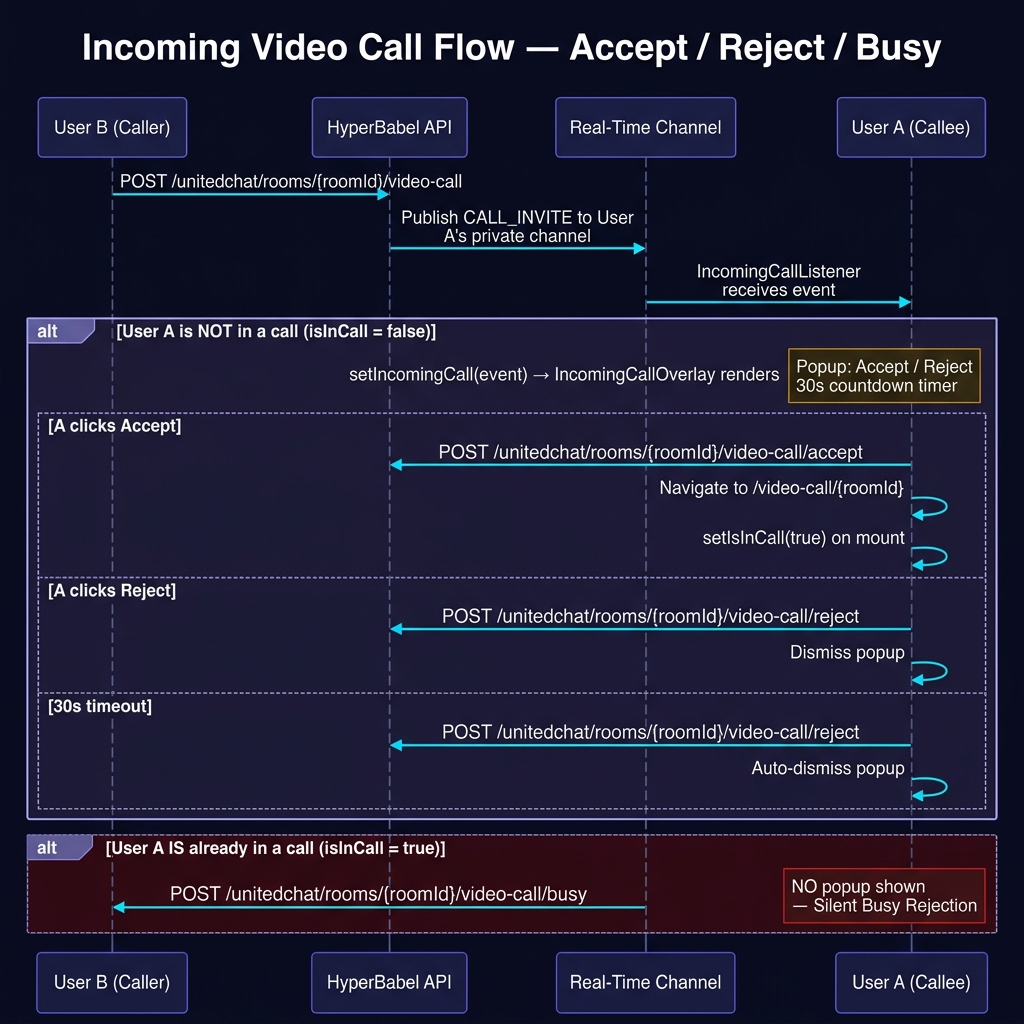
✅ Accept
POST /video-call/accept
Callee joins RTC channel
❌ Reject
POST /video-call/reject (reason: declined)
call_rejected logged
⏱ Ring timeout (client-side, e.g. 45 s)
POST /video-call/reject (reason: missed)
call_missed logged · caller exits
📵 Busy (already in a call)
POST /video-call/reject (reason: busy)
call_busy logged · caller toast
Start Video Call
/api/v1/unitedchat/rooms/:roomId/video-callInitiate a 1:1 or group video call linked to a chat room. Generates RTC tokens, sends CALL_INVITE signals, records a call_started system message.
Who is called. In a 1:1 room the other member is called and target_user_ids is ignored; in a group room target_user_ids is required (missing → 400 invalid_request); open rooms do not support calls (400 forbidden). Each invitee gets their rtc_token in the CALL_INVITE signal or from GET /video-call/active — accept returns only { success: true }. When the caller authenticates with a customer JWT, the response keeps only the caller's own rtc_token.
Errors. 400 invalid_request · 400 plan_upgrade_required / limit_exceeded (participant cap) · 402 spend_cap_reached · 403 quota_exceeded (Free-plan monthly quota) · 403 forbidden (customer-JWT caller or targets not members of the room) · 409 caller_busy / targets_busy.
Declare the billing resolution tier with quality: 'hd' (default) | 'fhd' | '2k' | '2k_plus'. The value is persisted on the session row and decides which bucket the call's user-minutes land in (hd_video_mins / fhd_video_mins / k2_video_mins / k2plus_video_mins). It cannot be changed mid-session — end the session and create a new one to switch tiers. Declaring the tier your app actually transmits and receives is a contractual obligation; group calls are metered on aggregate received resolution, so a multi-party call can sit a tier above the same per-stream resolution in 1:1.
Optional self-check — publish_resolution. Send it as { width: 1280, height: 720 } — the resolution this session will actually publish at this participant count (not your camera's maximum) and we will check your declaration for you. Each participant receives every other stream, so we multiply by the participant count − 1. We add that up and compare it with quality; if the sum lands in a higher tier the response carries a quality_warning string. The call still succeeds and billing still follows quality — the field exists because the most common billing surprise is an honest 720p declaration on a group call, not a false one. If your app lowers the resolution as people join, send the value for the size you are joining at.
{
  "caller_id": "user_A",
  "target_user_ids": ["user_B"],
  "quality": "hd",    // optional — "hd" (default) | "fhd" | "2k" | "2k_plus"
  "publish_resolution": { "width": 1280, "height": 720 }   // optional self-check
}{
"session": {
"id": "b6f1…",
"channel_name": "uc-video-mm62pcca-4f2a9c1e",
"call_type": "1to1",
"status": "created",
"quality": "hd", // ← the tier this session bills at
"participants": [
{ "user_id": "user_A", "uid": 1, "rtc_token": "...", "status": "active" },
{ "user_id": "user_B", "uid": 2, "rtc_token": "...", "status": "invited" } // rtc_token omitted for customer-JWT callers
],
"app_id": ""
},
"caller": { "user_id": "user_A", "uid": 1, "rtc_token": "..." },
"targets": [ … ]
// "quality_warning": "…" ← present only if publish_resolution implies a higher tier
}Accept Call
/api/v1/unitedchat/rooms/:roomId/video-call/acceptRecord call acceptance. Marks participant status as active and returns only { success: true }. The accepting user then joins the RTC media channel with the rtc_token from their CALL_INVITE signal (or from GET /video-call/active).
{
  "user_id": "user_B",
  "session_id": "b6f1…"
}{
"success": true
}Reject Call
/api/v1/unitedchat/rooms/:roomId/video-call/rejectRecord a call rejection. session_id is required. reason: "declined" (default) | "busy" | "missed"; user_name is optional. The caller learns about it from the room channel: a chat message (event "message") whose data.message_type is "video_call" and data.metadata.event is call_rejected, call_busy or call_missed (with metadata.session_id, user_id and reason).
{
  "user_id": "user_B",
  "session_id": "b6f1…",
  "reason": "busy"
}{
"success": true
}Leave Call (recommended way to end a 1:1 call)
/api/v1/unitedchat/rooms/:roomId/video-call/leaveEither participant calls /leave when they're done. When active participants drop to 1 or below, the backend automatically marks the session ended, broadcasts call.ended, and records the call_ended chat message with duration. This is the recommended ending pattern for room-scoped 1:1 calls — it works for both caller and callee without requiring host-only permission.
Billing. When this call ends the session (last active participant left), it writes the call's user-minutes into the bucket for session.quality (hd_video_mins / fhd_video_mins / k2_video_mins / k2plus_video_mins) and increments api_calls. Minutes are user-minutes — a 10-minute call between two people records 20. Callers authenticated with a customer JWT (for example, apps using the Firebase ID token exchange) are metered exactly like API-key callers.
{
  "session_id": "b6f1…",
  "user_id": "user_A"
}// Last active participant — session auto-ends { "success": true, "action": "session_ended", "active_count": 0 }
End Call for Everyone (caller, owner or sub_admin)
/api/v1/unitedchat/rooms/:roomId/video-call/endForcefully terminate the session for ALL participants. Permission gate: only the original caller, the room owner, or a sub_admin can call this. Regular participants should use /leave instead — calling /end returns 403 forbidden. Useful for moderators dismissing a runaway group call. This route does not publish call.ended on the session channel — the other participants learn about it from the call_ended chat message on the room channel (data.message_type 'video_call', data.metadata.event 'call_ended'), so handle that message as well.
Billing. Same metering as /leave — records user-minutes into the bucket for session.quality (hd_video_mins / fhd_video_mins / k2_video_mins / k2plus_video_mins) plus an api_calls increment. Customer-JWT and API-key callers are metered identically.
{
  "session_id": "b6f1…",
  "user_id": "user_A"
}{
"success": true,
"duration_seconds": 222
}
// Non-host attempt:
// 403 { "error": { "code": "forbidden", "message": "Only the caller or a room owner / sub_admin can end the call for all. Use /leave to drop only yourself." } }Group Video Call
A participant can leave individually without ending the session. The session auto-ends when the last active participant leaves.
target_user_ids) on this route; POST /video/sessions allows 4. Requesting more returns 400 limit_exceeded. On plans without group video the cap is 2 (1:1) and the error is 400 plan_upgrade_required. A participant who left re-joins with POST /video-call/accept (same session_id), then /renew-token if the original token has expired.// Group Call Flow
Caller (A) Invitee (B) Invitee (C)
|-- POST /video-call ->|-- CALL_INVITE ----->|
|<===== RTC media channel (bidirectional) =====>|
| |
|-- A leaves -------->| | // POST /leave → A status="left"
| |<-- call.participant_left // toast shown to B, C
|-- B leaves -------->| | // POST /leave → 1 active → auto end
| | call.ended | // → C exitsLeave Group Call (Individual)
/api/v1/unitedchat/rooms/:roomId/video-call/leaveLeave a group video call without ending the session for others. If active participants drop to 1 or below, the session auto-ends and call.ended is published.
{
  "session_id": "b6f1…",
  "user_id": "user_A"
}// Case 1: Others still active { "success": true, "action": "participant_left", "active_count": 2 } // Case 2: Last participant → session auto-ended { "success": true, "action": "session_ended", "active_count": 0 }
Get Active Call (Join Banner)
/api/v1/unitedchat/rooms/:roomId/video-call/activeCheck if a chat room has an ongoing video call. Show a 'Join ongoing call' banner instead of 'Start call' when active=true.
// No body — GET request
// Header: Authorization: Bearer
{
  "active": true,
  "session": {
    "id": "b6f1…",
    "call_type": "group",
    "status": "active",
    "active_participant_count": 2,
    "participants": [...]
  }
}
// or: { "active": false, "session": null }Renew RTC Token (long calls / re-join)
/api/v1/unitedchat/rooms/:roomId/video-call/renew-tokenMint a fresh RTC token for the current user's participant slot in the room's active session. Pair this with the media SDK's 'token will expire' callback — the issued RTC tokens last 1 hour, so calls that exceed that (or that get re-joined after a long pause) will otherwise silently drop. The endpoint does not write to the session — only the token is regenerated, with the same uid + channel + publisher role. Returns 403 forbidden if the caller is not a participant of the session, 404 if no active session exists.
{
  "user_id": "user_A",
  "session_id": "b6f1…"   // optional — defaults to the room's most recent live session
}{
"session_id": "b6f1…",
"channel_name": "uc-video-mm62pcca-4f2a9c1e",
"uid": 1,
"rtc_token": "" ,
"app_id": "" ,
"expires_in": 3600
}Report Media Join (room calls)
/api/v1/unitedchat/rooms/:roomId/video-call/joined-rtcCall this once from every participant's app (1:1 and group) as soon as joining the media channel succeeds. It stamps the participant's media-join time, which is where billable call time starts and what tells other clients the peer is really connected. Idempotent — repeat calls keep the first stamp. A customer JWT may only report for its own user_id (403 forbidden otherwise).
{
  "session_id": "b6f1…",
  "user_id": "user_B"
}{
"success": true,
"matched": true
}Call Heartbeat (room calls)
/api/v1/unitedchat/rooms/:roomId/video-call/heartbeatSend about once a minute from every participant's app while the call screen is open. The server uses the newest heartbeat to tell a live call from an abandoned one: a call whose heartbeats stop is ended automatically and billed only up to the last heartbeat (see Auto-expire Safety Net). A customer JWT may only send for its own user_id.
{
  "session_id": "b6f1…",
  "user_id": "user_B"
}{
"success": true
}Realtime Signaling
HyperBabel includes a built-in real-time signaling layer for call events. Your app receives these events through the HyperBabel Realtime API. A Realtime token scoped to your org is obtained via the token endpoint.
user:{orgId}:{callee}Sent to each invitee when a call is initiated. Carries the callee's RTC credentials, the actual call cardinality, and the full target list so the receiving overlay can render its label (e.g. "Group call · with 2 others") without an extra room fetch.
{
"type": "CALL_INVITE",
"sessionId": "b6f1…",
"callerId": "user_A",
"callerName": "Alice",
"callType": "1to1" | "group", // call cardinality
"mediaType": "video", // media kind
"channelName": "uc-video-mm62pcca-4f2a9c1e",
"rtcToken": "" ,
"uid": 2,
"app_id": "" ,
"roomId": "room_xyz",
"roomSignalChannel": "" ,
"target_count": 2, // total invitees (excl. caller) — at most 2 on this route
"target_ids": ["user_B","user_C"],
"target_names": { // { user_id → display_name }
"user_B": "Bob", "user_C": "Carol"
}
}hb:{orgIdWithoutDashes}:{channel_name}Accept and reject are announced to everyone in the room — including the caller — as a chat message on the room channel (event name "message"). Check data.message_type === "video_call" and branch on data.metadata.event. There is no separate accept / reject signal on the user channel.
{
  "type": "message",
  "timestamp": "2026-03-11T10:00:05Z",
  "data": {
    "id": "msg-uuid",
    "sender_id": "system",
    "message_type": "video_call",
    "metadata": {
      "event": "call_accepted",   // call_rejected | call_busy | call_missed
      "session_id": "b6f1…",
      "user_id": "user_B",
      "user_name": "Bob",
      "reason": "declined"        // reject only: declined | busy | missed
    }
  }
}user:{orgId}:{caller}Sent to the caller when they start a call (POST /video-call) and a target is already in another call — one signal per busy target. A callee who rejects with reason "busy" does not trigger this signal; that produces the call_busy room message above.
{
  "type": "CALL_BUSY",
  "target_user_id": "user_B",
  "target_user_name": "Bob",
  "reason": "busy",
  "room_id": "room_xyz"
}sandbox_video:{sessionId}Standalone sessions only (POST /video/sessions): published right after the session is created, with the real-time event name "message".
{
"type": "call.created",
"session_id": "b6f1…",
"channel_name": "hb::call:4f2a9c1e" ,
"participants": [ … ]
}sandbox_video:{sessionId}Broadcast when someone leaves a group call (session still active). Real-time event name: call.participant_left.
{
  "type": "call.participant_left",
  "session_id": "b6f1…",
  "user_id": "user_A",
  "user_name": "Alice",
  "active_count": 2
}sandbox_video:{sessionId}Broadcast when the last active participant leaves (/leave), when a standalone session is ended with POST /video/sessions/:id/end, and when the server cleans up an abandoned session. Real-time event name: call.ended. End for everyone (/video-call/end) does not publish it — listen for the call_ended room message as well. The standalone /end event carries duration but no reason.
{
  "type": "call.ended",
  "session_id": "b6f1…",
  "reason": "last_participant_left",   // or auto_expired_abandoned | auto_expired |
                                      //    sandbox_time_limit | orphan_reaped_at_busy_gate
  "left_user_id": "user_B",           // last_participant_left only
  "duration": 222                     // server cleanup and standalone /end
}
Video Call · Error Codes
Endpoints in this section share a structured error envelope: { "error": { "code": "...", "message": "..." } } — with two exceptions: a validation error on POST /video/sessions returns { "error": [ …validation issues ] }, andGET /video/sessions/:id, /join and /end return plain-string errors such as { "error": "Session not found" }. Map these codes in your client so users see the right copy and your app can decide whether to retry, suggest an action, or silently dismiss.
| HTTP | code | Where | Meaning · Recovery |
|---|---|---|---|
| 400 | invalid_request | POST /video-call | A required field is missing — caller_id, or target_user_ids in a group room (1:1 rooms ignore target_user_ids and call the other member). |
| 400 | forbidden | POST /video-call | "Video calls not available in open rooms" — start calls from 1:1 or group rooms. |
| 403 | quota_exceeded | POST /video-call · POST /video/sessions | Free plan only — the monthly allocation for this video tier is used up. Upgrade the plan or wait for the monthly reset. |
| 403 | forbidden | POST /video-call | A customer-JWT caller is not a member of the room, or named targets who are not room members. (caller_id itself is not rejected — the server replaces it with the token owner.) |
| 400 | no_valid_targets | POST /video-call | target_user_ids is empty after deduplication and removing the caller. Ask the user to pick at least one other participant. |
| 400 | limit_exceeded | POST /video-call | More than 2 target_user_ids requested on this route. Cap is 3 participants total (caller + 2); POST /video/sessions allows 4. |
| 400 | plan_upgrade_required | POST /video-call · POST /video/sessions | The plan does not include group video, so calls are limited to 2 participants (1:1). Upgrade the organization's plan to start group calls. |
| 400 | sandbox_quality_not_allowed | POST /video/sessions · POST /stream/sessions · POST /video-call | Test API keys run at HD only. Higher tiers (fhd, 2k, 2k_plus) take the same code path, so the sandbox verifies your integration rather than the resolution tier — request those with a live key. |
| 403 | sandbox_limit_reached | POST /video/sessions · POST /stream/sessions · POST /video-call · POST /storage/presign | This month's sandbox allowance for that feature is used up. It resets on the 1st of next month and does not affect live API keys. Sessions already running are unaffected. |
| 402 | spend_cap_reached | POST /video-call · POST /video/sessions · POST /stream/sessions | The organization has reached its monthly spend limit, so no new billable session may start. Calls already in progress are unaffected. Raise the limit in Console → Subscription to resume immediately. |
| 409 | call_full | POST /video/sessions/:id/join | The session is already at its participant cap for the organization's plan. Late joiners should be told the call is full. |
| 400 | forbidden | POST /video-call | "Cannot video call yourself" — the 1:1 room only contains the caller. Ask the user to pick a room with another member. |
| 403 | forbidden | POST /video-call/accept | "Cannot accept a call as another user" — a customer-JWT caller passed a user_id that is not their own. Accept with the authenticated user's own id (org API keys can accept on behalf of any user). |
| 403 | forbidden | POST /video-call/end | Only the call's caller, the room owner, or a sub_admin can end the session for everyone. Regular participants should call /leave instead — the session ends automatically once one or fewer participants remain active. |
| 403 | forbidden | POST /video-call/renew-token | The user is not a participant of the targeted session. Re-check session_id / user_id before retrying. |
| 404 | not_found | /video-call/* | The room (or session, for /renew-token) does not exist in this org. Typically a stale URL — refresh the room list. |
| 409 | caller_busy | POST /video-call | The caller is already in another active session in this org (any device). Direct them to end the existing call first. The server checks every active participant across all platforms, so this is authoritative even when the existing call is on another device / browser. |
| 409 | targets_busy | POST /video-call | Every requested target is currently in another active session. Response carries busy_targets[]. For partial busy in group calls, the call proceeds with the available targets and the caller receives CALL_BUSY signals per skipped target — no 409. |
| 410 | session_ended | POST /video-call/accept | The session was wound down between INVITE delivery and the Accept attempt — caller canceled, cron sweep, or End-for-All by another participant. Dismiss the incoming overlay and show a brief "Call already ended" cue. |
A successful no-op (e.g. /leave on an already-ended session, /end while a /reject was racing) returns200with a message body so the client doesn't have to special-case idempotent retries.
Auto-expire Safety Net
Your app should call /leave or/end whenever a session completes — that's how durations are measured accurately and how chat history records the outcome. Room-scoped call clients should also call /video-call/joined-rtc when the media join succeeds and /video-call/heartbeat about once a minute during the call. OS process termination, network outages, and force-quits all skip cleanup, so HyperBabel runs a server-side sweeper (every 10 minutes) so abandoned sessions don't pin a participant in a permanent "busy" state.
status='created' · 3 min
Sessions where no one ever accepted or joined are ended once they are more than 3 minutes old — with the 10-minute sweep, that is 3–13 minutes after creation. No minutes are recorded. Reason: auto_expired_abandoned.
status='active' · 10 min without heartbeat / 8 hr
An active call whose newest participant heartbeat is more than 10 minutes old is ended, and any active session is ended once it has run for 8 hours (this also catches sessions that never sent heartbeats). Reason:auto_expired. In addition, when a user starts a new room call, their own earlier call is ended on the spot if it has had no heartbeat for 3 minutes (reason orphan_reaped_at_busy_gate).
When an auto-expire fires, HyperBabel publishescall.ended on the session channel (sandbox_video:{sessionId}) with the matching reason. Treat it identically to a normal end — wind down the local UI, surface the duration if you tracked it. Billable minutes for a sweep-ended active session run from the session start to the newest participant heartbeat (or to the sweep time if no heartbeat was ever sent), capped at 2 hours, multiplied by the number of participants. Standalone sessions (POST /video/sessions) send no participant heartbeat, so only the 8-hour rule applies to them — always call /end. Sessions these sweeps end also send the video.session.ended webhook, withended_reason set to auto_expired_abandoned (never answered) or auto_expired (no heartbeat / 8 hours), alongside thecall.ended event and the room's call_ended message.
Live Stream API
Full live broadcast infrastructure. Supports host broadcasting and viewer token generation. All endpoints require Authorization: Bearer hb_live_xxx and the live_stream scope.
403 plan_upgrade_required on session creation. Plans that ship a dedicated realtime project also return 409 provisioning_in_progress until that project is set up. Sandbox keys (hb_test_*) are exempt from both, so you can try live streaming on any plan from the Console Sandbox Hub. See the Pricing page for which plans include it in production.List Live Streams
/api/v1/stream/sessionsList stream sessions for the organization, filtered by status. Use this to build a live broadcast discovery screen — viewers can see who is currently live and click to join. Ended streams are automatically excluded when using status=live.
// GET — no body
// Query params:
//   status  — 'live' | 'created' | 'ended'  (default: 'live')
//   limit   — max results (default: 20, max: 100)
Authorization: Bearer hb_live_xxx

// Example: GET /api/v1/stream/sessions?status=live&limit=20
{
  "sessions": [
    {
      "id": "stream_uuid",
      "title": "Live Q&A Session",
      "status": "live",
      "host": {
        "user_id": "host-001",
        "display_name": "Yujin"
      },
      "viewer_count": 42,
      "started_at": "2026-03-16T10:00:00Z",
      "created_at": "2026-03-16T09:58:00Z"
    }
  ],
  "total": 1
}Create Stream Session
/api/v1/stream/sessionsCreate a new live stream session and generate an RTC publisher token for the host. Optionally provide host display info (name, profile image, preferred language) for rich stream UI.
Declare the billing resolution tier with quality: 'hd' (default) | 'fhd' | '2k' | '2k_plus'. The value is persisted on the session row and decides which bucket the stream's user-minutes land in (hd_stream_mins / fhd_stream_mins / k2_stream_mins / k2plus_stream_mins). It cannot be changed mid-session.
Optional self-check — publish_resolution. Send it as { width: 1280, height: 720 } — the resolution the host will actually publish (not the camera's maximum) — and we will check your declaration for you. Viewers subscribe to the host stream only, so for a broadcast the aggregate is simply the host resolution — no multiplication. We compare it with quality; if it lands in a higher tier, the response carries a quality_warning string. The stream is still created and billing still follows quality. If the host's resolution changes during the broadcast, send the resolution it starts at.
Pre-checks run before any broadcaster credential is allocated: 403 { code: 'plan_upgrade_required' } when the plan does not include live streaming, 409 { code: 'provisioning_in_progress' } while a dedicated realtime project is still being set up, 402 { code: 'spend_cap_reached' } when the organization has hit its monthly spend limit, and 403 { code: 'quota_exceeded' } when a free-tier monthly limit is exhausted.
/start response note: the response of POST /api/v1/stream/sessions/:sessionId/start includes sandbox_time_limit_seconds: 900 ONLY for sandbox keys. Live/production keys never receive this field — their streams have no time cap.
{
  "host_user_id": "host-001",
  "title": "Live Q&A Session",
  "host_display_name": "Yujin",           // optional
  "host_profile_image_url": "https://cdn.example.com/yujin.png",  // optional
  "host_preferred_lang_cd": "ko",          // optional, BCP-47
  "quality": "hd",                         // optional — "hd" | "fhd" | "2k" | "2k_plus"
  "publish_resolution": {                  // optional — what the host will actually publish
    "width": 1280, "height": 720
  }
}// 201 Created { "session": { "id": "stream_uuid", "channel_name": "hb:orgid:stream:abc123", "rtm_channel": "hb:orgid:stream:abc123_signal", // subscribe for stream.started / stream.ended "title": "Live Q&A Session", "status": "created", "quality": "hd", // ← the tier this stream bills at // "quality_warning": "…" ← present only if publish_resolution implies a higher tier "app_id": "" , "host": { "user_id": "host-001", "display_name": "Yujin", "uid": 10000, "rtc_token": "" // valid 24 hours } } } // Real-time events on rtm_channel — event name "message": // { "type": "stream.started", "session_id": "stream_uuid" } ← on /start // { "type": "stream.ended", "session_id": "stream_uuid" } ← on /end
Get Viewer Token
/api/v1/stream/sessions/:sessionId/viewer-tokenGenerate an RTC subscriber token for a viewer. Call this whenever a viewer joins the stream. Optionally provide viewer info to identify them in the stream chat. The token is valid for 1 hour — to renew it, call again with the same user_id and rejoin with the returned uid and token (every call issues a new uid). Every distinct viewer counts toward the stream's billed user-minutes: calls with the same user_id count once, but a call without user_id registers a new anonymous viewer each time, so always pass a stable user_id when you can.
{
  "user_id": "viewer-002",                 // optional
  "viewer_display_name": "Oliver",         // optional
  "viewer_profile_image_url": "https://cdn.example.com/oliver.png",  // optional
  "viewer_preferred_lang_cd": "en"         // optional, for translation
}{
"channel_name": "hb:orgid:stream:abc123",
"uid": 482113, // random per call (20000–919999)
"token": "" , // valid 1 hour
"display_name": "Oliver",
"profile_image_url": "https://cdn.example.com/oliver.png",
"preferred_lang_cd": "en",
"app_id": ""
}Start Broadcast
/api/v1/stream/sessions/:sessionId/startTransition the stream session from 'created' to 'live' status. Call this when the host taps 'Go Live'. Fires a stream.session.started webhook.
// No body required
// Headers
Authorization: Bearer hb_live_xxx
{
  "session": {
    "id": "stream_uuid",
    "channel_name": "hb:orgid:stream:abc123",
    "status": "live",
    "started_at": "2026-03-10T10:00:00Z",
    ...
  }
  // "sandbox_time_limit_seconds": 900  ← ONLY for sandbox (hb_test_*) keys
}Stream Host Heartbeat
/api/v1/stream/sessions/:sessionId/heartbeatHosts MUST POST to this endpoint every ~30 seconds while broadcasting. The server uses the most recent heartbeat to detect a crashed or abandoned host within minutes and end the session automatically — billing then reflects the actual stream duration (last heartbeat → started_at) rather than the 8-hour wall-clock fallback. Fire-and-forget: a single failed heartbeat is non-fatal; stop sending once you call /end.
// No body required
// Headers
Authorization: Bearer hb_live_xxx
{ "ok": true }End Broadcast
/api/v1/stream/sessions/:sessionId/endMark the stream as ended, calculate duration, and record usage. Fires a stream.session.ended webhook. Streams are billed in user-minutes: (the host + every distinct viewer that requested a viewer token) × the whole stream duration, in the bucket for the session's quality. Ending a stream that has already ended returns the session with already_ended: true.
// No body required
// Headers
Authorization: Bearer hb_live_xxx
{
  "session": {
    "id": "stream_uuid",
    "status": "ended",
    "duration_seconds": 3600,
    "ended_at": "2026-03-10T11:00:00Z",
    ...
  }
}

// Already ended — idempotent
{ "session": { ... }, "already_ended": true }
Translation API
AI-powered translation supporting individual text, batch multi-language, automatic language detection, and supported language lookup. All endpoints require Authorization: Bearer hb_live_xxx and the translate scope.
Translate Text
/api/v1/translate/textTranslate a single text string to a target language. text: 1–10,000 characters. source_language defaults to 'auto' (auto-detect). Returns the detected source language and the input character count for usage transparency. Out-of-range input returns 400 { error: { code: 'validation_error', … } }.
{
  "text": "안녕하세요",
  "target_language": "en",
  "source_language": "auto"   // optional, default: auto-detect
}{
"translated_text": "Hello",
"source_language": "ko",
"target_language": "en",
"char_count": 5
}Translate to Multiple Languages
/api/v1/translate/batchTranslate a single text string to multiple target languages in one request. text: 1–10,000 characters; target_languages: 1–10 codes (more returns 400 validation_error). Ideal for broadcasting a message to a multilingual audience. successful_languages lists the codes that returned a translation (failures, e.g. unsupported pairs, are silently skipped).
{
  "text": "안녕하세요",
  "target_languages": ["en", "ja", "fr", "zh"],
  "source_language": "auto"   // optional
}{
"translations": {
"en": "Hello",
"ja": "こんにちは",
"fr": "Bonjour",
"zh": "你好"
},
"char_count": 5,
"successful_languages": ["en", "ja", "fr", "zh"]
}Detect Language
/api/v1/translate/detectDetect the language of a given text string (1–10,000 characters). Returns the detected language code (BCP-47) and a confidence score (0.0–1.0).
{
  "text": "안녕하세요"
}{
"detected_language": "ko",
"confidence": 0.99
}Supported Languages
/api/v1/translate/languagesGet the list of all supported translation language codes. Use the returned codes as source_language or target_language values. count is the total number of languages in the languages array.
Mobile/web SDKs using a customer JWT should call /api/v1/customer/translate/languages instead — same response, customer-JWT auth so the org API key never ships in the binary.
// GET — no body
// Headers
Authorization: Bearer hb_live_xxx
{
  "languages": [
    { "code": "ko", "name": "Korean" },
    { "code": "en", "name": "English" },
    { "code": "ja", "name": "Japanese" },
    { "code": "zh", "name": "Chinese (Simplified)" },
    { "code": "fr", "name": "French" }
  ],
  "count": 195
}
Speech Translation API
Realtime speech-to-text with live translation over a single WebSocket. Stream your end-user's microphone audio and receive live captions — the original transcript and, optionally, its translation — as the user speaks. Recognition covers 60 spoken languages with in-stream translation between them, powered by the same HyperBabel engine behind HyperBabel Video live captions.
At a glance
Endpoint — wss://api.hyperbabel.com/api/v1/stt-relay
Auth — end-user customer JWT passed as the ?token= query parameter (a WebSocket handshake cannot set headers from browsers/mobile). Mint it server-side via POST /api/v1/customer/issue-token — your org API key never ships in the client binary.
Audio in — raw binary PCM, 16 kHz · mono · 16-bit signed little-endian.
Captions out — JSON messages: live partial hypotheses and utterance-complete final segments, each with a matching translation track.
Scope — speech translation attaches to an active video call session (created via the Video Call API or the United Chat call flow). Standalone transcription outside a call is not supported in v1.
Billing — metered per minute while a speech-translation stream is active — from connect until it ends, rounded up per stream, silent frames included (see Plan allowance & metering below). During long pauses, stop sending audio frames or send EOS.
Plan allowance & metering
Paid plans include a monthly allowance of speech-translation minutes, and usage is metered per minute a speech-translation stream is active — from the moment the stream connects until it ends, rounded up to the whole minute per stream — not per call and not per participant. Two speakers captioned for the same 10-minute call consume 20 minutes.
Silence still counts while the stream is active. A stream goes idle on its own after about 60 seconds without any audio and stops accruing until audio arrives again — so during long pauses, stop sending audio frames (or send EOS to end the stream). A client that keeps sending silent frames keeps the stream active.
Plans with a zero allowance (the Free plan) are rejected at connect with 403 stt_not_enabled — speech translation is not part of that plan. Past the allowance: paid plans keep working and the excess is billed as metered overage. A session is refused with 402 spend_cap_reached once the organization reaches its monthly spend limit. Current allowances and the overage rate are listed on the Pricing page.
Check it programmatically with GET /api/v1/auth/usage (org API key) — the response carries stt_mins (consumed this billing month) against monthly_stt_mins (your plan's allowance; -1 = unlimited, 0 = not included in the plan). Poll it from your backend to raise your own alerts before users hit the ceiling.
How it works
1. [Your server]  POST /api/v1/customer/issue-token   (org API key)
                  → { access_token }                   // end-user customer JWT

2. [Your server]  Create the video call session (org API key —
                  POST /api/v1/video/sessions is API-key-only) → { session.id }
                  — or the client starts a room-scoped call itself with its
                  customer JWT: POST /api/v1/unitedchat/rooms/:roomId/video-call

3. [Client]       Open the relay socket
                  wss://api.hyperbabel.com/api/v1/stt-relay
                     ?token=<customer_jwt>
                     &lang=ko                          // spoken language
                     &translate=en                     // optional target
                     &session_id=<video session id>

4. [Client]       Wait for {"kind":"ready"} → stream mic PCM (binary frames)
                  ← {"kind":"partial","text":"안녕하","lang":"ko"}
                  ← {"kind":"final","text":"안녕하세요.","lang":"ko"}
                  ← {"kind":"final_tr","text":"Hello.","lang":"en"}

5. [Client]       Send "EOS" (text frame) to finish — usage is metered on close.
Want to see it before writing code? Open Console → Sandbox Hub → Live Captions Test — a zero-setup playground that runs this exact API against your sandbox environment.
WebSocket Protocol
Connection query parameters
| Parameter | Required | Description |
|---|---|---|
token | Yes | End-user customer access JWT (from /customer/issue-token). |
lang | Yes | Spoken language code — any stt_lang_cd from GET /api/v1/stt/languages. |
translate | No | Target language code for live translation. Omit for transcription-only (no *_tr messages). |
session_id | One of | Active video call session id (the session.id returned by POST /api/v1/video/sessions). The connecting user must be a participant. |
room_id | One of | Alternative to session_id for room-scoped calls created through the United Chat call flow. |
Client → server
| Frame | Meaning |
|---|---|
| binary | Raw PCM audio — 16 kHz, mono, 16-bit signed little-endian. Send in small batches (~100 ms) as the mic produces it. Send only after ready — queue or drop audio captured before it. |
"FINALIZE" | Force-finalize the current utterance but keep the stream open — useful when the user pauses captions (standby stays warm, resuming is instant). |
"EOS" | End of stream. The relay flushes the last utterance, meters the session, and closes. |
Server → client (JSON text frames)
kind | Meaning |
|---|---|
ready | Recognition engine connected — start streaming audio. Sent once per connection. |
partial | Live hypothesis of the current utterance (original language). Cumulative — each partial replaces the previous one. |
final | Utterance complete (detected at natural pauses) — a clean, stable segment. Ideal unit for display history or downstream processing. |
partial_tr / final_tr | Translation track — same semantics as partial/final, in the translate target language. Only sent when translate was set. |
keepalive | Heartbeat during audio gaps — ignore it (but treat unknown kinds as ignorable too, for forward compatibility). |
error | Something went wrong — { "kind":"error", "fatal": true | false, "code"?, "message" }. fatal: false is a transient engine error — the stream continues, so keep sending audio. fatal: true means the session is ending and the socket closes. See Errors & Limits below. |
// Message samples
{"kind":"ready"}
{"kind":"partial","text":"I am a Kor","lang":"en"}
{"kind":"final","text":"I am a Korean.","lang":"en"}
{"kind":"partial_tr","text":"나는 한국","lang":"ko"}
{"kind":"final_tr","text":"나는 한국 사람입니다.","lang":"ko"}
{"kind":"error","fatal":false,"message":"speech recognition service error"}   // transient — keep streaming
{"kind":"error","fatal":true,"code":"stt_not_enabled","message":"Realtime speech translation is not included in your plan"}   // socket closes
Resilience: the relay transparently maintains its upstream connection across brief engine reconnects — your socket stays open and no audio is lost during normal operation. If the socket does close, reconnect with the same parameters (mint a fresh JWT if yours expired).
Languages
Supported Spoken Languages
/api/v1/stt/languagesThe full list of spoken-language codes accepted by the lang parameter. Accepts either an org API key or a customer JWT, so client apps can populate a language picker directly. The set is small and changes rarely — cache it client-side in your app. Use the same codes (base part) for the translate target.
// GET — no body // Headers (either works) Authorization: Bearer hb_live_xxx // org API key Authorization: Bearer// end-user token
{
  "languages": [
    {
      "id": 31,
      "stt_lang_cd": "ko",
      "language_name": "Korean",
      "native_name": "한국어",
      "country_name": null,
      "country_cd": null,
      "search_keywords": null
    },
    {
      "id": 15,
      "stt_lang_cd": "en",
      "language_name": "English",
      "native_name": "English",
      "country_name": null,
      "country_cd": null,
      "search_keywords": null
    }
  ]
}
Errors & Limits
Browser and mobile WebSocket APIs don't expose the handshake's HTTP status. So, except for 401 (bad or expired token) and 429 rate_limited — plain HTTP rejections, where your socket simply closes (typically with code 1006) — every check below is reported by opening the socket, sending one {"kind":"error","fatal":true,"code":"<code>","message":"…"} frame, and closing with code 1008 (close reason = the code). The Status column is the HTTP status each check maps to; a request without a WebSocket upgrade always gets 426 Upgrade Required before any check runs. After the stream starts, problems arrive as {"kind":"error"} messages.
| Status | error.code | Meaning |
|---|---|---|
| 401 | — | Missing/invalid/expired customer JWT. |
| 403 | account_suspended | The end user's account is not active. |
| 403 | subscription_inactive | The organization has no active subscription. |
| 403 | stt_not_enabled | Speech translation is not included in the org's plan (for example, the Free plan). |
| 402 | spend_cap_reached | The organization has reached its monthly spend limit, so no new billable session may start. Raise the limit in Console → Subscription to resume. |
| 409 | no_active_call | No active video call session found with this user as a participant — check session_id/room_id and that the call hasn't ended. |
| 429 | rate_limited | Too many session opens (per-user, per-minute). Back off and retry. |
| 429 | concurrency_limit | Too many concurrent speech sessions for this user or organization (plan-dependent). |
Storage API
Globally distributed file storage with built-in security. Supports chat file delivery and external API uploads. Files are automatically categorized by extension — the category drives the storage folder layout and the message_type hint returned by presign.
Download egress is 100% free.
Folder navigation, file listing, downloads, deletion, and preview (image/video/audio) functions are provided in the Storage Explorer (Console → Storage).
🖼️ images
jpg, jpeg, png, gif, webp, avif, svg, heic, heif
🎬 videos
mp4, mov, avi, webm, mkv
🎵 audio
mp3, wav, aac, m4a, flac, ogg
📄 documents
pdf, doc, docx, xls, xlsx, ppt, pptx, txt, csv
📦 files
everything else (zip, apk, bin, ...)
There is no global extension allowlist — any file type can be uploaded. The exception is open rooms, where your organization's open-room policy (Console) can disable file transfers or restrict allowed types — see the presign error cases below.
The per-file limit equals your plan's monthly storage quota (monthly_storage_mb), capped at a hard 5 GB per file (plans with unlimited storage get the 5 GB cap). Oversized presign requests are rejected with 400 file_too_large.
Step 1 — Request Presigned Upload URL
/api/v1/storage/presignPre-validate file size (per-file limit) and storage quota, derive the file's category from its extension, and return a presigned PUT URL for direct-to-storage upload. The URL is valid for 15 minutes.
Free-tier orgs that have exhausted their monthly_storage_mb allocation get 403 { error: { code: 'quota_exceeded' } } BEFORE any bytes hit storage — the upload won't even start. Organizations that have reached their monthly spend limit get 402 { error: { code: 'spend_cap_reached' } } at the same point.
channelId must be a room / channel id (UUID) — any other value is rejected with 400 { error: { code: 'invalid_request' } }. When channelId points at an open room, your organization's open-room policy (configured in the Console) also applies — file transfers can be disabled entirely, or restricted to specific types.
// application/json { "filename": "profile_photo.jpg", "mimeType": "image/jpeg", "fileSize": 524288, // bytes "channelId": "" , // for chat uploads — a room / channel id (UUID) "folder": "uploads" // for API uploads (default: "uploads") } // Headers — your org API key, or the user's customer JWT from your app Authorization: Bearer hb_live_xxx
// 201 Created { "message": "Presigned upload URL created", "data": { "upload_url": "https://storage.hyperbabel.com/...?Signature=...", "key": "/chat/ , // without channelId:/images/1762450000000_ .jpg" /user-content/ / /… "expires_in": 900, "message_type": "image", "category": "images" } } // 400 — file exceeds the plan per-file limit { "error": { "code": "file_too_large", "message": "File exceeds plan per-file limit (500 MB)." } } // 400 — channelId is not a room / channel id (UUID) { "error": { "code": "invalid_request", "message": "channelId must be a room id" } } // 402 — monthly spend limit reached { "error": { "code": "spend_cap_reached" } } // 403 — free-tier monthly storage quota exhausted { "error": { "code": "quota_exceeded" } } // 403 — test key: this month's sandbox storage allowance is used up { "error": { "code": "sandbox_limit_reached" } } // 403 — open-room policy: file transfers disabled { "error": { "code": "open_room_files_disabled" } } // 400 — open-room policy: file type not allowed { "error": { "code": "open_room_file_type_not_allowed" } }
📤 Step 2 — Direct Upload (Client → Storage)
PUT the raw file binary to the upload_url from Step 1. The file goes directly to storage — the HyperBabel server is not involved.
Step 3 — Confirm Upload
/api/v1/storage/confirmAfter the client finishes uploading to storage, call this endpoint to verify the file exists, record usage, and get back the final file metadata. Idempotent — repeat confirms of the same key do not double-count usage.
// application/json { "key": "/chat/ , // from presign response "originalName": "profile_photo.jpg", // Optional — honored for API-key (hb_live_ / hb_test_) and console calls only: // • channel_id: a room UUID — otherwise extracted from the key path (chat uploads only) // • uploader_id: otherwise left empty // With a customer JWT both are ignored — the channel always comes from the // key path and the uploader is always the token's end-user. "channel_id": "/images/..." " , "uploader_id": "alice-uuid" } // Headers Authorization: Bearer
// 200 OK { "message": "Upload confirmed", "data": { "key": "/chat/ , "url": "https://cdn.hyperbabel.com/...", "original_name": "profile_photo.jpg", "size_bytes": 524288, "mime_type": "image/jpeg", "message_type": "image" } } // 403 — key not in your organization ("Key not in this org"), or — with a customer // JWT — not issued by /storage/presign (only user-content/ and chat/ keys) { "error": { "code": "forbidden", "message": "Key was not issued by presign" } } // 404 — file not found in storage (upload failed or incomplete) { "error": { "code": "not_found", "message": "File not found in storage. Upload may have failed." } }/images/1762450000000_ .jpg"
💬 Chat File Delivery — Full Flow
// 1. Presign
POST /api/v1/storage/presign
{ "filename": "photo.jpg", "mimeType": "image/jpeg", "fileSize": 524288, "channelId": "" }
→ { "data": { "upload_url": "...", "key": "...", "message_type": "image" } }

// 2. Direct upload to storage
PUT {upload_url}
Content-Type: image/jpeg
(raw file binary)

// 3. Confirm upload
POST /api/v1/storage/confirm
{ "key": "...", "originalName": "photo.jpg" }
→ { "data": { "url": "https://cdn.hyperbabel.com/...", "original_name": "photo.jpg", "size_bytes": 524288, "mime_type": "image/jpeg", "message_type": "image" } }

// 4. Send as chat message
POST /api/v1/unitedchat/rooms/{roomId}/messages
{
  "sender_id": "user_123",
  "content": "{data.url from step 3}",
  "message_type": "image",
  "metadata": {
    "file": {
      "original_name": "photo.jpg",
      "size_bytes": 524288,
      "mime_type": "image/jpeg"
    }
  }
}
Get Signed Download URL
/api/v1/storage/url/:key(*)Generate a temporary signed download URL for a private file, valid for 1 hour. Pass ?originalName=<file name> to have that name set in the Content-Disposition header (otherwise none is set). :key is the full path returned from the upload response.
// GET — no body
// Header: Authorization: Bearer hb_live_xxx  or JWT
// :key = full file path from upload response
// Optional query: ?originalName=profile_photo.jpg
{
  "url": "https://storage.hyperbabel.com/...?X-Amz-Expires=3600&X-Amz-Signature=..."
}